Blooket vs Quizalize: Which Quiz Tool Wins in Class?
Choosing between Blooket and Quizalize comes down to one core question: do you want high-energy game sessions that students beg to play again, or structured mastery tracking that tells you exactly who needs help before the next test? Both platforms turn multiple-choice review into something students actually look forward to — but they do it in ways that serve different classrooms. This guide covers every major difference so you can pick the right tool the first time.
What are Blooket and Quizalize?
Blooket is a game-first quiz platform where students answer questions to earn coins and power-ups inside competitive mini-games. Quizalize is a data-first quiz platform where questions feed a skills map that shows teachers which concepts each student has and hasn’t mastered. The distinction shapes every feature both platforms offer.
How Blooket works
Teachers create or import a question set, then launch a live game with a code. Students join, answer questions, and use their earnings inside one of more than fifteen game modes — each with its own mechanics. Gold Quest rewards speed and introduces risk; Tower Defense uses correct answers to build a base; Battle Royale eliminates the lowest scorers. The question content stays the same across modes; the wrapper around it changes constantly.
A free Blooket account covers most of what a classroom needs: all major game modes, unlimited live sessions, question import from Quizlet, and basic accuracy reports. The paid subscription (Blooket Plus) adds extras like set cloning and extended data, but the core product is fully functional for free.
How Quizalize works
Quizalize, built by the UK-based EdTech company Zzish, organizes quizzes around curriculum skills. Teachers tag each question to a learning objective, then assign quizzes live or as homework. After students complete a quiz, Quizalize generates a skills map: a color-coded grid showing which students have reached mastery on each tagged skill (typically defined as sustained accuracy above a set threshold across multiple attempts) and which haven’t.
The platform supports live team modes and individual practice, but the reporting layer is the product’s real identity. Teachers can assign targeted follow-up quizzes to struggling students directly from the report screen, without rebuilding anything from scratch.
How do Blooket and Quizalize compare on core features?
Blooket leads on engagement tools; Quizalize leads on data tools. Neither platform is strictly better — the right pick depends on what you need a quiz tool to do most of the time.
Game modes and student engagement
Blooket’s variety is its biggest strength. With more than a dozen distinct game modes, students rarely feel like they’re doing the same activity twice. The randomness built into modes like Gold Quest — where answering correctly might steal coins or lose them, depending on the draw — keeps even well-reviewed content unpredictable and exciting.
Quizalize has a Team Mode that creates genuine competition, but the engagement model is simpler: answer faster and more accurately than the opposing team. There’s no persistent reward economy, no collectible characters, and no power-ups that carry across sessions. Students who love Blooket’s chaos will find Quizalize comparatively straightforward — which is either a feature or a flaw depending on your class.
Question types and content creation
Both platforms support multiple-choice questions. Blooket adds true/false. Quizalize extends further with image-based questions and more detailed answer explanations, and its editor prompts teachers to tag each question to a curriculum skill before saving.
Blooket’s question editor is faster. A teacher can build a complete 20-question set in under five minutes and be running a live game shortly after. Quizalize’s editor takes longer because the skill-tagging step is baked into the workflow — but that tagging is exactly what makes the post-quiz reports actionable rather than decorative.
Reporting and progress tracking
This is where the two platforms diverge most sharply. Blooket’s post-game reports show per-student and per-question accuracy. The numbers are clear and easy to read. What they don’t do is tell a teacher what to do next — there’s no mastery layer, no grouping of students by performance tier, and no direct path from report to next assignment.
Quizalize’s skills map does all three. Color-coded cells show at a glance which students have mastered a concept and which are still below threshold. From that same screen, teachers can reassign targeted practice to specific students. For formative assessment, the gap between these two reporting systems is significant.
Which platform works better in the classroom?
The best platform depends on grade level, subject, and the specific role you need quiz software to play. After testing both tools across different subjects and age groups, a consistent pattern emerges: Blooket wins with younger students and high-energy review sessions, Quizalize wins when the goal is instructional decision-making.
For younger students (grades K–8)
Blooket is the stronger choice for this age group. The blook collection mechanic — earning coins to unlock and customize cartoon characters — creates real excitement that persists across multiple sessions. Elementary and middle school students respond to visual rewards and game-show energy in ways that leaderboards alone don’t replicate.
Game modes like Crazy Kingdom and Café introduce light strategy elements that keep faster students engaged while slower ones work through questions at their own pace. Sessions typically fit cleanly into a 20–30 minute class period without setup headaches.
For older students and high school
Both platforms hold up at the secondary level, but for different reasons. Blooket’s Battle Royale and Tower Defense modes stay popular with older students, especially during rapid-fire AP or standardized test review where recall speed matters. The competitive stakes feel age-appropriate rather than childish.
Quizalize becomes more useful at higher grade levels because curriculum standard alignment matters more there. A teacher reviewing for an end-of-year exam can see which students haven’t yet met the threshold on specific tested standards and assign focused practice before it’s too late. That’s a different kind of value than a high-scoring game session.
For homework and self-paced study
Quizalize handles asynchronous use more completely. Teachers assign a quiz, students complete it on their own schedule, and the platform tracks attempts, accuracy over time, and mastery status for each assigned skill. When students return to class, the teacher already knows who reviewed and who struggled.
Blooket’s solo practice mode exists and works, but the game mechanics that drive engagement during live sessions feel less compelling without classmates around. Students can access any public question set independently, which is genuinely useful for self-directed practice — it just doesn’t produce the teacher-facing data that Quizalize does.
Blooket vs Quizalize: pricing breakdown
Both platforms have free tiers that cover real classroom use. The paid plans unlock meaningfully different things, and understanding what each tier actually adds makes the upgrade decision clearer.
Free plan comparison
Blooket’s free plan is unusually generous. All major game modes are available, question set creation and import work without a paywall, and teachers can host unlimited live sessions. The main free-tier constraints involve the number of saved sets and some discovery features, not core gameplay.
Quizalize’s free plan covers quiz creation, live and homework assignments, and the basic skills report for classes up to a certain size. The features that make Quizalize distinctive — the skills map and mastery tracking — are accessible on the free tier, which means teachers can genuinely evaluate the platform before paying anything.
Paid plans
Blooket Plus adds set cloning, additional question types, extended historical reports, and priority support. The upgrade is designed for frequent users who want fewer workflow friction points, not for unlocking entirely different capabilities.
Quizalize’s paid tiers expand class size limits, add advanced analytics, enable parent reporting, and unlock integration with additional curriculum standard frameworks. Schools purchasing for multiple teachers gain admin tools that make deployment easier.
Specific prices change, so checking each platform’s pricing page directly before making a decision is the right move.
Blooket vs Quizalize: side-by-side comparison
| Feature | Blooket | Quizalize |
|---|---|---|
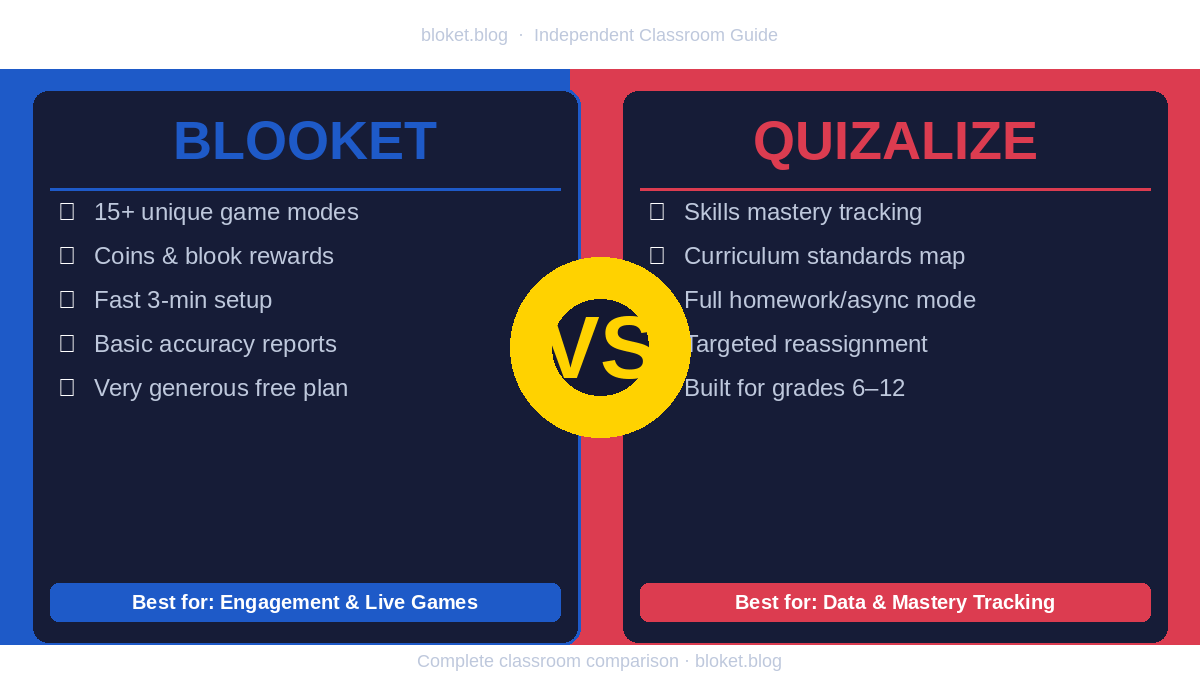
| Live game modes | 15+ distinct modes | 1 team mode |
| Question types | Multiple choice, true/false | Multiple choice, image-based |
| Curriculum standard tagging | No | Yes |
| Skills mastery tracking | No | Yes |
| Homework/async assignment | Basic | Full |
| Free plan generosity | High | Moderate |
| Student engagement level | Very high | Moderate |
| Post-quiz data depth | Accuracy scores | Full mastery map |
| Best age fit | K–10 | 6–12 |
| Setup speed | Fast (under 5 min) | Moderate |
| Standalone student practice | Yes (any public set) | Teacher-assigned only |
What teachers actually think: pros and cons
Blooket strengths and weaknesses
Student motivation is real and durable. The blook collection system gives students a reason to keep playing that isn’t just the review content itself. Teachers report students asking to play Blooket before the teacher brings it up — which is not a common experience with quiz software.
Setup is genuinely fast. A teacher who just found a relevant Quizlet set can import it, pick a game mode, and be running in under three minutes. That speed matters on lesson days when prep time ran short.
Reports are thin. Post-game data shows who got what right. It does not show trends across sessions, flag students approaching a threshold, or suggest instructional next steps. Teachers who need that layer have to build it themselves.
Some game mechanics disconnect reward from knowledge. In Gold Quest, answering correctly doesn’t guarantee gaining coins — the outcome has a random element. Students can win sessions without dominating on accuracy, which matters if the goal is formative assessment rather than engagement.
Quizalize strengths and weaknesses
The skills map is genuinely actionable. Seeing a color-coded grid of every student’s mastery status, by skill, after a single homework assignment gives teachers a starting point for differentiation that Blooket simply doesn’t provide.
Mastery tracking works across attempts. A student who scores 45% on the first try and 80% on the second gets credited for improvement. The platform builds a cumulative picture rather than treating each quiz as isolated.
Student excitement is lower. Quizalize’s interface is clear and functional but clinical. Younger students who are used to Blooket’s characters and game economy find Quizalize noticeably less exciting. For high school students, this gap is smaller but still present.
Free plan class size limits can frustrate. Teachers with larger classes may hit restrictions on the free tier that push them toward a paid plan sooner than they’d like. Blooket’s free plan doesn’t impose comparable constraints on class size.
FAQs
Is Blooket better than Quizalize? Blooket is better for live student engagement and game-based review. Quizalize is better for mastery tracking and curriculum-aligned data. The right answer depends entirely on what you need most: if engagement is the challenge, choose Blooket. If instructional insight is the challenge, choose Quizalize.
Can you use both Blooket and Quizalize in the same class? Yes, and many teachers do. Blooket works well for high-energy live review sessions. Quizalize handles homework assignments and mastery tracking. Using both means each tool does what it’s best at rather than asking one platform to cover everything.
Is Quizalize free to use? Quizalize offers a free plan that includes quiz creation, live sessions, homework assignments, and basic skills reporting for smaller classes. Larger classes and advanced analytics require a paid subscription. Check Quizalize’s website for current limits on the free tier.
Does Blooket track student mastery over time? Blooket does not have a mastery tracking system. Its reports show per-student accuracy for each game session, but the platform does not aggregate data across sessions into skill mastery scores. Teachers who need that capability will need a separate tool or Quizalize.
Which platform is easier for students to join? Both use a simple code-based join system that doesn’t require student accounts for live sessions. Blooket uses a numeric game code; Quizalize uses a class code. For mastery tracking across multiple sessions, Quizalize does require students to log in — which adds one extra step compared to Blooket’s fully anonymous live play.
Can students use Blooket without a teacher? Students can practice independently in Blooket’s solo mode using any publicly shared question set, without teacher involvement. Quizalize does not allow students to browse and play independently — content must be assigned by a teacher first.
Which platform works better on phones? Both platforms run in mobile browsers without requiring an app download. Blooket’s game interface is built with touch interactions in mind, making it slightly smoother on phones and tablets than Quizalize’s more desktop-oriented layout. For classrooms where students use phones rather than laptops, Blooket handles the experience better.
Conclusion
Blooket and Quizalize solve genuinely different problems. If the challenge in your classroom is getting students invested enough to actually engage with review content — especially with younger grades or high-energy topics — Blooket’s game economy, variety, and collectibles make it the clearer pick. If the challenge is knowing which students have mastered which skills before a major assessment, Quizalize’s data layer gives teachers something Blooket cannot.
For most teachers, the practical starting point is simple: use Blooket’s free plan for live sessions and trial Quizalize’s free tier for homework assignments. Both are free to start. Run them with your actual students on the same content and see which data you find yourself using. That answer will tell you more than any comparison article can.Share
Peruse our diverse collection of powerful stories—crafted to motivate and drive meaningful, lasting change in your life.