Blooket vs Quizizz: Complete Comparison for Classrooms
Picking a review game tool sounds simple until you actually sit down to test one. Blooket and Quizizz both turn quiz questions into competitive games, but they reward students differently, manage classrooms differently, and suit different lesson types. After running both platforms across dozens of review sessions, the short answer is this: Blooket wins on game variety and student excitement, while Quizizz wins on assessment data and teacher control. This guide breaks down exactly where each platform pulls ahead.
What’s the core difference between Blooket and Quizizz?
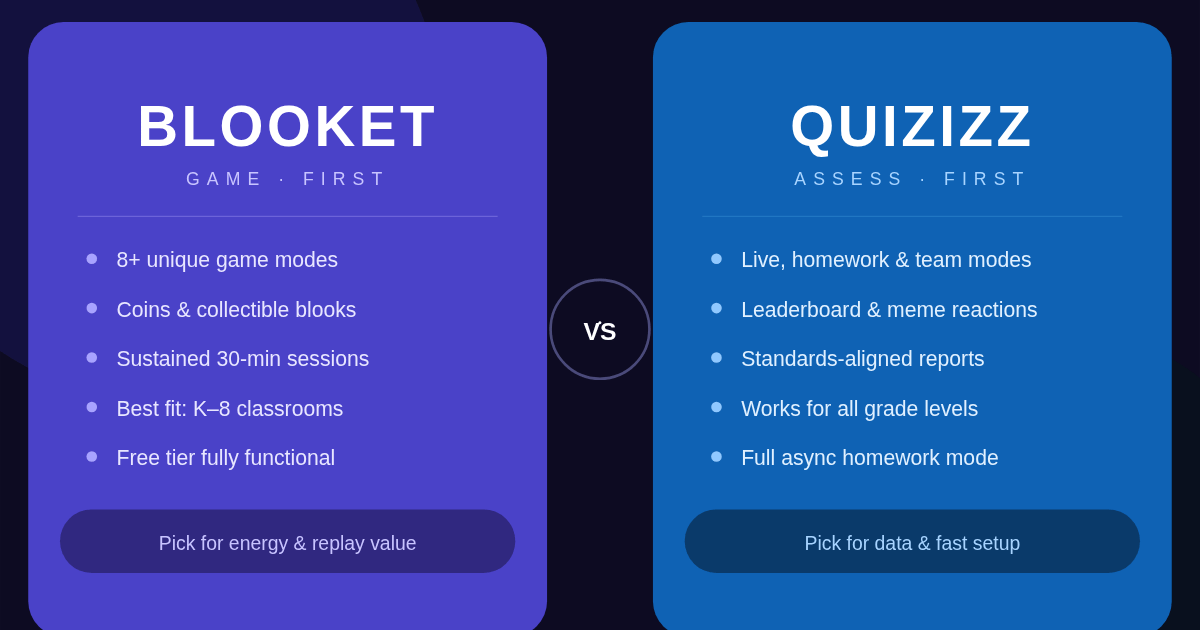
Blooket turns quiz answers into in-game currency that students spend on collectible characters called blooks, while Quizizz keeps the focus on live leaderboards, memes, and structured assessment reports. Blooket feels like a game with a quiz attached. Quizizz feels like a quiz with game elements layered on top. That single distinction shapes almost everything else about how the two platforms are used.
How Blooket works
A teacher builds or imports a question set, picks one of several game modes, and starts a session with a join code. Students answer questions correctly to earn coins, then spend those coins inside mini-games tied to whichever mode is running. The scoring isn’t purely about speed or accuracy; it’s about how well a student plays the mini-game layered on top.
In my classroom trials, this mini-game layer is what kept lower-performing students engaged. A student who answered three questions wrong could still pull ahead in modes like Tower Defense or Café simply by managing in-game resources well. That changes the emotional stakes of getting an answer wrong.
Coin totals carry across sessions in most modes, which means students build up a personal stash over weeks rather than starting fresh every class. That persistence is part of why students ask for Blooket by name when a review day is announced. It also means a single bad round rarely feels like a total loss, since coins earned in a previous session often still count toward unlocking a new blook.
How Quizizz works
Quizizz keeps the experience closer to a traditional quiz. Students see questions on their own device, answer at their own pace within a time limit, and watch a live leaderboard update after each question. Memes and reaction GIFs appear after answers to keep the tone light, but the core loop stays question-and-answer rather than question-then-minigame.
This makes Quizizz faster to run when class time is short. There’s no setup phase for a game board or character selection screen; students join, and the quiz starts within a minute.
Speed and accuracy both factor into the points a student earns for each question, so a fast wrong guess scores lower than a slightly slower correct one. That balance discourages pure guessing without punishing students who simply read carefully. After the session ends, the leaderboard freezes, giving a clean stopping point that’s easy to record for a class log or a parent update.
How do Blooket and Quizizz compare on game modes and engagement?
Blooket offers a wider range of distinct game modes, which gives teachers more ways to repeat the same question set without it feeling stale, while Quizizz focuses on a smaller set of formats designed around test-like conditions and live energy. Choosing between them often comes down to whether you want variety or consistency.
Blooket’s game modes
Blooket’s mode library includes options built for very different classroom goals:
- Gold Quest: Students race to bank coins before opponents can steal them, which works well for short five-minute reviews.
- Tower Defense: Correct answers earn resources used to build defenses against waves of enemies, popular with students who enjoy strategy games.
- Café: Students manage a virtual restaurant, balancing speed against quality, which rewards consistent accuracy over single lucky guesses.
- Battle Royale: Pairs students against each other in head-to-head matchups, adding social stakes that solo modes don’t have.
- Classic mode: A no-frills format closer to a traditional quiz, useful when you want the game element minimized for a formal review.
Rotating between these modes with the same underlying question set is one of the simplest ways to review material twice without students noticing they’re repeating content.
Quizizz’s game formats
Quizizz organizes its formats around the type of session rather than a themed mini-game:
- Live quiz: The standard synchronous format with a real-time leaderboard, best for whole-class review.
- Homework or self-paced mode: Students complete the same quiz independently with a deadline, useful for asynchronous assignments.
- Team mode: Groups compete together, combining individual scores into a team total, which softens the pressure on any single student.
- Lessons: Quizizz lets teachers embed quiz slides directly into instructional content, blending teaching and checking for understanding in one flow.
Blooket vs Quizizz at a glance
| Feature | Blooket | Quizizz |
|---|---|---|
| Game variety | Multiple themed mini-games | Live, homework, and team formats |
| Pacing | Slower, game-driven | Faster, quiz-driven |
| Best for | Engagement and replay value | Assessment and reporting |
| Reward system | In-game currency and collectibles | Points and leaderboard rank |
| Asynchronous use | Limited | Strong, with homework mode |
| Data export | Basic results summary | Detailed standards-aligned reports |
Which platform fits different classroom needs?
The right choice depends less on which platform is “better” overall and more on what a specific lesson needs that day. A platform built for excitement won’t always serve a formal assessment well, and a platform built for clean data won’t always hold attention during a Friday review game.
Best for younger students and high-energy review
Younger students respond strongly to the collectible and mini-game layer in Blooket. In my classroom trials with elementary and early middle school groups, the chance to unlock a new blook kept students answering questions even after they’d already secured a strong score, because the incentive wasn’t just rank, it was the next unlock.
Best for test prep and formal assessment
Quizizz’s reporting tends to break down performance by individual question and by student, which matters more in upper grades where teachers need to identify specific misconceptions before a real test. If the goal is diagnosing what students don’t understand yet, rather than just energizing a review day, Quizizz’s data layer does more of that work for you.
Best for fast-paced review days
When class time is tight, Quizizz’s live quiz format starts faster because there’s no game board to load or character to pick. Blooket’s setup adds a minute or two depending on the mode, which is worth it for a planned game day but can feel slow when you only have ten spare minutes before a bell rings.
Pricing and access
Both platforms operate on a freemium model: a free tier covers most classroom needs, including live hosting and basic reporting, while a paid subscription tier unlocks extra question types, deeper analytics, and additional customization options. Neither platform requires payment to run a standard review session, so cost rarely needs to be the deciding factor for a first trial.
Importing and building question sets
Both platforms let teachers build sets from scratch or import existing question banks rather than retyping content. Blooket supports importing sets from spreadsheet-style files and other quiz tools, while Quizizz offers a large public library of teacher-created quizzes that can be duplicated and edited. If your class library already exists in one ecosystem, that existing investment is worth weighing before switching platforms entirely.
How do device requirements and accessibility compare?
Both platforms run entirely in a web browser, so neither requires students to install an app or create a personal account to join a session, which keeps setup friction low for shared classroom devices. The differences show up more in how each platform handles slower connections and older hardware.
Device and connection needs
Blooket’s mini-games render more graphics per round, which means older tablets or shared lab computers can occasionally lag during busier modes like Tower Defense. Quizizz’s lighter interface tends to load faster on the same hardware, since there’s no game board to animate beyond the question screen and leaderboard.
Neither platform requires a strong internet connection to function, but a shared classroom wifi network under heavy load will affect Blooket’s mini-game modes sooner than it affects a standard Quizizz live round. If your school’s network has known bandwidth issues during full-class sessions, that’s worth testing with a small group before committing to a graded review day.
Accessibility considerations
Quizizz’s self-paced homework mode gives students who read or process more slowly the option to complete questions without a class-wide timer pushing them forward, which matters for differentiated classrooms. Blooket’s live format keeps everyone moving at a similar pace, though most modes don’t impose a hard per-question time limit the way a timed assessment would.
Both platforms support text-based questions with images, and both display questions in a large, readable font by default. Neither platform offers built-in text-to-speech for question reading, so classrooms with younger readers or students with reading support needs may want to read questions aloud regardless of which platform is running.
What do engagement and learning outcomes look like in practice?
Engagement and retention aren’t the same thing, and conflating them is one of the easiest ways to misjudge which platform actually helps students learn. A loud, exciting round doesn’t always translate into stronger recall a week later, and a quiet, fast-paced round doesn’t always mean students are absorbing less.
What sustained engagement looks like
In my classroom trials, Blooket’s collectible system extended attention spans during longer review blocks because students stayed motivated by the next unlock rather than just the current question. Across a 30-minute session, engagement held steady from start to finish in a way that a straight quiz format sometimes struggled to match once the novelty of the first few questions wore off.
What focused, fast review looks like
Quizizz’s live leaderboard creates a sharper, shorter burst of competitive energy that works well for a ten-minute warm-up or closer. Students tend to focus harder on individual questions because the leaderboard updates immediately, giving instant feedback on exactly how a single answer affected their rank.
Matching the format to the goal
A unit review the day before a test benefits from Quizizz’s detailed breakdown of which questions tripped up the most students, since that data can directly shape what gets re-taught. A Friday recap session, where the goal is simply reinforcing material in a low-stakes way, tends to benefit more from Blooket’s replay value, since students will happily run the same question set twice if a new game mode is attached to it.
Most comparison guides treat this as a single winner-takes-all decision, but that framing causes teachers to drop a tool that would have worked fine for a different lesson type. Here are the assumptions worth checking before you commit to one platform exclusively.
Myth: one platform is objectively better than the other
Both platforms were built around different goals, so “better” depends entirely on what a lesson needs. A platform chosen for assessment accuracy will feel slow during a hype review day, and a platform chosen for engagement will feel imprecise during a graded check for understanding.
Myth: game-based platforms can’t produce useful data
Blooket’s reporting is lighter than Quizizz’s, but it still shows per-question accuracy and individual student performance. It’s not built for standards tracking the way Quizizz’s reports are, but dismissing it as data-free undersells what’s actually available after a session ends.
Myth: students will get bored of the same platform
Variety within a single platform often solves this without switching tools entirely. Rotating Blooket’s game modes, or alternating between Quizizz’s live and team formats, resets novelty without requiring students to learn a second interface.
Myth: free tiers are too limited for regular use
Both platforms’ free tiers cover live hosting, leaderboards, and basic results for an entire class, which is enough for most weekly review routines. Paid tiers add depth, not the core functionality teachers actually rely on most often.
Myth: younger and older students need different platforms entirely
Age matters less than the specific goal of the activity. A high schooler reviewing for a final still benefits from the dopamine hit of unlocking a blook, and a third grader can handle a straightforward Quizizz live round when the questions are simple enough.
FAQs
Is Blooket or Quizizz better for classroom management? Quizizz tends to give teachers tighter control during a session, including the ability to pause and review individual questions live. Blooket’s game modes run more independently once started, which works well for engagement but offers fewer mid-game intervention tools.
Can students play Blooket or Quizizz without a teacher hosting live? Quizizz supports a self-paced homework mode that students can complete on their own schedule. Blooket is built primarily around live, teacher-hosted sessions, though some game modes allow solo practice outside of a live game.
Which platform works better on shared classroom devices? Both platforms run in a browser without requiring an account on student devices, using a join code instead. Performance is similar on shared devices, though Blooket’s mini-games can run slightly heavier on older hardware.
Do Blooket and Quizizz support importing questions from other quiz tools? Yes, both platforms support importing existing question sets rather than requiring teachers to build everything from scratch. This makes switching between tools far less disruptive than it might first appear.
Is Quizizz more accurate for grading than Blooket? Quizizz’s reporting breaks results down by standard and by question more thoroughly, which makes it a stronger fit when results need to inform a grade. Blooket’s results are accurate but less detailed in how they’re organized afterward.
Which platform keeps students more engaged over a full class period? Blooket’s mini-game layer tends to sustain attention longer during extended sessions because the reward loop keeps changing. Quizizz holds attention well for shorter, faster-paced rounds but can feel repetitive if stretched across a full period.
Can teachers use Blooket and Quizizz for the same subject interchangeably? Yes, since both platforms accept the same basic multiple-choice and short-answer question formats. The choice usually comes down to pacing and reporting needs rather than subject-matter limitations.
Is one platform more reliable for large classes? Both platforms handle large class sizes well, since scoring happens individually on each student’s device rather than relying on a shared connection. Network stability in the room matters more than which platform is running.
Final verdict
Choose Blooket when the goal is energy, replay value, and a review session that feels like a reward rather than a chore. Choose Quizizz when the goal is structured data, fast setup, or asynchronous practice outside class time. Many teachers end up using both, picking whichever fits that day’s lesson instead of forcing one tool to do every job. Try running the same question set through each platform once and let your students’ reaction settle the decision for your classroom.
Tap into collective wisdom from industry leaders—browse our handpicked reads that address everyday struggles head-on.