Best Blooket Sets for Math Class: A Teacher’s Guide
The best Blooket sets for math class are not the ones with the highest play count. They share three things: a narrow focus on one skill, answer choices that mirror how students actually compute on paper, and a game mode chosen to match the kind of practice the lesson calls for.
In my own classroom trials, the sets that flopped almost always mixed grade levels in one deck or paired a fast, chaotic mode with multi-step word problems that needed quiet thinking time. This guide is an independent resource for players and teachers, not an official Blooket page. It walks through what to look for in a public set, how to build your own in under ten minutes, and which game modes actually help math retention instead of just keeping the room loud.
What makes a Blooket set actually work for math class?
A Blooket set works for math when every question tests one specific skill, the wrong answers represent realistic mistakes instead of random distractors, and the question count matches the length of the class period. Sets that blend arithmetic, geometry, and word problems in one deck force students to switch mental gears every few seconds, and that costs accuracy.
Question variety without losing focus
A good fractions set sticks to fraction operations. It does not slip in a decimal conversion question every fifth item unless the lesson goal is specifically equivalence between fractions and decimals. Once I started splitting “fraction addition” and “fraction conversion” into two separate sets, accuracy on both topics went up within a single week of practice.
Twenty to twenty-five questions is a comfortable size for a single skill. That range gives enough repetition for the skill to stick without the set feeling repetitive by question fifteen.
Answer formatting that doesn’t trip up correct thinking
Math answers need a consistent format across the whole set. If three questions show answers as fractions and the fourth suddenly switches to a decimal, students who solved the problem correctly can still pick the wrong option just from format confusion.
Distractors matter just as much as the correct answer. The strongest math sets use wrong answers that come from a real procedural slip, like forgetting to find a common denominator or misplacing a decimal point, rather than a number that has nothing to do with the problem.
Why math sets need different rules than vocabulary or history sets
A vocabulary question carries built-in context clues. A definition usually gives away enough of the answer that a student can guess intelligently even on a partial recall. A math problem doesn’t work that way.
The number 47 looks exactly as plausible as the correct answer of 52 unless the student actually does the calculation, which means a math set lives or dies on whether the distractors reflect a real computational error rather than a number pulled at random.
This is also why timing matters more for math sets than for almost any other subject. Modes built for fast factual recall, where a round runs a few seconds per question, work against a student who needs fifteen or twenty seconds to carry a digit or simplify a fraction. According to Blooket’s own mode previews, a mode like Tower Defense is built around a ten-minute round length and self-paced prompting, which gives students room to actually work the problem instead of racing a clock built for a one-word answer.
Set length matched to class time
Short sets of ten to fifteen questions suit a quick five-minute warm-up or exit ticket. Medium sets of fifteen to twenty-five questions fit a standard review block. Long sets that stretch toward thirty-five questions work best for a full-period comprehensive review before a test, paired with a self-paced mode so nobody feels rushed through the last few problems.
Class size matters too. A free Blooket account supports up to 60 players in a single game, which covers nearly any single class roster, while a paid subscription tier raises that ceiling for combined or multi-class sessions. Either way, the best Blooket sets for math class are sized to the lesson rather than stretched out just to fill a longer period.
How do you find or build the right Blooket math set?
You can pull a ready-made set from Blooket’s public set library through the discover search, filter by subject and grade band, or build a custom set in the editor by typing questions directly or importing a spreadsheet. Vetting a public set before hosting it live usually takes less time than writing one from scratch.
Search and filter the public set library
- Log in at blooket.com and open the discover or library search.
- Type a specific search term, such as “6th grade fraction operations” rather than just “math,” to cut down on irrelevant results.
- Filter by subject when the option is available, and skim the question count shown on each set’s preview card.
- Check the set’s play count and any visible rating as a rough signal of quality, but don’t treat it as proof the content is accurate.
- Open two or three candidates in preview before picking one, since the title alone rarely tells you whether the difficulty matches your class.
A search that’s too broad, like just typing “math,” buries the handful of strong, narrowly focused sets under hundreds of mixed-topic ones. The more specific the search term, including the grade level and exact skill, the easier it is to land on one of the best Blooket sets for math class on the first try instead of the fifth.
Naming and organizing sets you build over time
Once you start building your own sets, a consistent naming pattern saves real time later. A format like “Skill, grade band, difficulty” such as “One-step equations, grade 7, easy” makes a set instantly findable in your own library months later, when you can no longer remember which exact title you used. Group related sets so that a fractions unit, for example, has separate entries for adding, subtracting, multiplying, and dividing rather than one catch-all deck labeled simply “fractions.”
Vet a community-made set before you host it
Open any public set in preview or solo mode and read through every question before your class ever sees it. Community-made sets are written by other teachers and students, not reviewed by an editorial team, so accuracy varies a lot from one set to the next.
Watch for outdated terminology, answer keys that mark the wrong choice as correct, and any uploaded images that look like ads or unrelated content. A single bad question can undo the trust you’re building with a review activity, so this five-minute check is worth the time.
Build your own set in the editor
- From your dashboard, select create, then choose to build a set from scratch — our step-by-step guide to creating a Blooket quiz walks through every option in the set builder.
- Give the set a clear title that names the exact skill, such as “Two-step equations: integers only.”
- Type each question and up to four answer choices, then mark the correct one.
- Add an image to a question only when it clarifies the math, such as a diagram for a geometry problem, since decorative images slow down reading.
- Set the visibility to private if you want to keep the set just for your classes, then save.
Import questions from a spreadsheet for speed
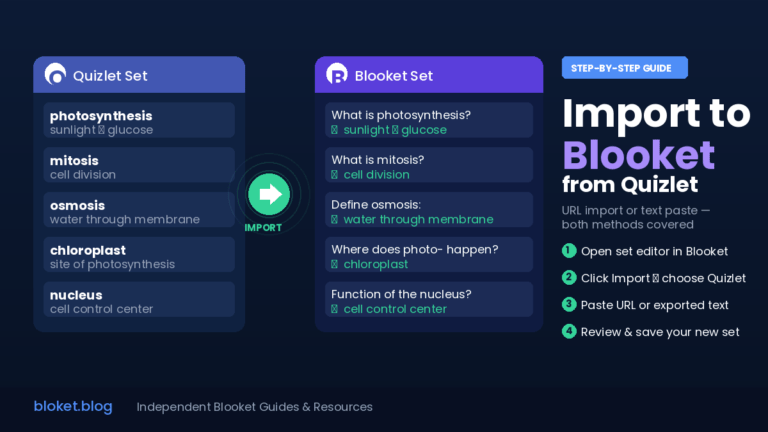
If you already have a worksheet or test bank of math problems, importing beats typing them in one at a time. Create a spreadsheet with columns for the question, each answer choice, and the correct answer, save it as a CSV file, then use the import option inside the set editor to bring all the questions in at once. This is the fastest path when you’re converting twenty or more existing problems into a playable set.
Which Blooket sets and modes fit each grade level?
The right Blooket set for math class changes by grade band because attention span, problem length, and the type of practice needed all shift as students get older. Younger students benefit from short, fast-recall sets, while older students need modes that allow time for multi-step reasoning without breaking concentration. For the youngest classes, our guide to Blooket for elementary teachers covers reading-level fit and beginner-friendly modes.
Specific math set topics worth building or searching for
Rather than searching for a vague subject tag, look for or build sets around a single named skill. Strong candidates include multiplication facts zero through twelve, order of operations following PEMDAS, one-step equations with positive integers, area and perimeter of basic polygons, unit rate and ratio word problems, and integer operations covering both positive and negative numbers. Each of these works as its own set because the skill is narrow enough to test cleanly in fifteen to twenty-five questions.
When a topic is genuinely broad, such as a full chapter review before a test, that’s the one case where a longer set covering several related skills makes sense, since the goal at that point is cumulative recall rather than first-pass mastery of one concept. Our guide to the best Blooket sets for test prep covers how to structure that pre-exam review.
Pairing game mode with problem type
Modes that include a spinning wheel or a chance to steal points from another player, such as Gold Quest, work well for quick recall items like basic facts or vocabulary terms, but they interrupt the flow needed for a problem that takes thirty seconds or more to solve. Self-paced modes that let each student move through questions on their own clock, such as Café or Tower Defense, suit multi-step problems because nobody loses their place waiting on a wheel to stop spinning.
Elimination modes like Battle Royale reward speed over accuracy, so they fit fact fluency drills better than they fit algebra or geometry problems that need careful reading.
A quick reference table
| Grade band | Common math focus | Mode that fits well | Why it works |
|---|---|---|---|
| Early elementary | Counting, basic addition and subtraction | Gold Quest or Racing | Short attention spans match quick, low-stakes recall rounds |
| Upper elementary | Multiplication facts, intro fractions | Tower Defense or Fishing Frenzy | Steady pacing rewards repeated practice without rushing |
| Middle school | Fraction and decimal operations, ratios, intro algebra | Café or Factory | Self-paced rounds give room for multi-step thinking |
| High school | Algebra, geometry, early functions | Classic or Café | Accuracy-focused scoring keeps results tied to actual mastery |
What mistakes make a math Blooket set fall flat?
Most weak math Blooket sets share one of a handful of avoidable problems: mixed grade levels in a single deck, a chaotic mode paired with slow-thinking content, no preview before going live, or settings left on default in a way that invites copying answers.
Mixing grade levels in one set
A set that jumps between single-digit addition and two-step equations forces every student into the wrong difficulty for part of the game. Split content by grade band even if it means hosting two shorter sets instead of one long one.
Choosing a chaotic mode for multi-step problems
A mode built around speed and randomness pulls focus away from a word problem that needs careful reading. Save the high-energy, steal-and-spin modes for fact recall, and reserve self-paced modes for anything with more than one calculation step.
Skipping the preview before going live
Hosting a set cold, without previewing it first, is how a wrong answer key or a confusing question makes it in front of the whole class. A two-minute preview catches most problems before they become a distraction during the live game.
Ignoring settings that invite copying
Random nicknames, shuffled answer order, and disabling late joins all make it harder for students to simply copy a neighbor’s answer. Reviewing the live leaderboard partway through the game also helps you spot a score pattern that looks more like copying than genuine recall.
Using flashy seasonal reskins for serious review
Blooket regularly releases seasonal versions of existing modes, where a holiday theme sits on top of the same underlying mechanic. A set hosted in a seasonal reskin of Gold Quest still behaves like Gold Quest underneath the new visuals, spinner and steal mechanic included. Save those reskins for a fun Friday review where the stakes are low, and stick with the standard version of a mode for any math review tied to an actual grade or test prep.
Putting your math sets to work
The best Blooket sets for math class come down to a narrow skill focus, answer choices that match the way students actually compute, and a game mode chosen for the type of thinking the problem demands rather than for how loud the round will be. None of that requires expensive tools or hours of prep once you know what to check for in a set before you hit start.
Start by picking one skill your class needs to review this week, either pull a vetted public set or build a short one of your own, and match it to a mode from the reference table above. Try it with your next review block and watch whether accuracy on your follow-up check improves compared to a worksheet covering the same skill.
FAQs
Are public Blooket sets for math accurate enough to use without changes? Some of the best Blooket sets for math class come straight from the public library with no edits needed, but many sets are never reviewed by anyone before publishing. Always preview a set in full before hosting it live, and check that answer keys and terminology match your curriculum.
How many questions should a math Blooket set have? Ten to fifteen questions suit a quick warm-up, fifteen to twenty-five fit a standard review, and up to thirty-five works for a full-period comprehensive review. Match the count to the time you actually have.
Which Blooket mode is best for fraction practice? Self-paced modes like Café work well for fraction operations because students need time to compute before answering. Faster modes with random steal mechanics fit basic fact recall better than multi-step fraction work.
Can I import an existing math worksheet into Blooket? Yes. Build a spreadsheet with columns for the question and each answer choice, save it as a CSV file, and use the import option in the set editor to bring all the questions in at once.
Should I let students create their own math Blooket sets? Older students can build review sets as a study activity, but check their question accuracy before the set gets used for a graded review, since self-made sets carry the same accuracy risk as any other public set.
Why do my students seem to copy answers during Blooket math games? Default settings sometimes leave real names visible and allow late joins, both of which make copying easier. Turn on random nicknames, shuffle the answer order, and disable late joins to cut down on this.
Does the game mode affect how well students actually learn the math? Yes. A mismatched mode either rushes students past problems that need thinking time or makes a simple fact-recall set feel slower than it needs to be. Matching mode to problem type keeps the scoring tied to actual understanding rather than luck or speed alone.
Is it better to use one long Blooket set or several short ones for math review? Several short, skill-specific sets usually outperform one long mixed set because students stay in one mental mode for the whole round. Save longer sets for cumulative review right before a test.
Solve real problems using case studies—stories that show you exactly how it’s done.