Manage Blooket Cheaters in Class: A Teacher’s Guide
Blooket turns review sessions into something students actually look forward to — but any teacher who has run more than a handful of live games knows what comes with that: cheating. Whether students are pasting console scripts, copying a neighbor’s screen, or quietly Googling answers, the problem is more common than most teachers expect. This guide covers how to spot it, how to stop it before it starts, and how to handle it when it happens — without turning a game session into a disciplinary event.
Why students cheat in Blooket
Blooket is built on competition. Students earn coins, unlock blooks, and climb a live leaderboard — in real time, in front of classmates. That combination of social visibility and reward structure creates genuine motivation to win, and for some students, that means cutting corners.
What cheating actually looks like
The most common methods teachers encounter in class:
- Auto-answer scripts: Students paste a short program into their browser’s developer console. The script reads the correct answer from the game’s code and selects it automatically — often in under a second. These scripts are widely shared online and are the hardest type to catch by observation alone.
- Screen copying: A student watches a faster classmate’s screen and mirrors their answer choice before the timer expires. This is low-tech but surprisingly effective in tightly seated classrooms.
- Answer lookup: Students tab over to Google, a class notes document, or a subject-specific site mid-question. In modes with 20-second or longer timers, this is entirely feasible.
- Multiple devices: A student plays on a phone hidden under the desk while their school device shows the game. The phone may have fewer restrictions than a school-managed laptop.
- Name flooding: In games left on public join settings, students or outside visitors enter with fake names, flooding the leaderboard and sometimes coordinating to share answers.
Why it matters more than a leaderboard position
Cheating in a low-stakes review game might seem trivial, but the costs are real. The student who uses an auto-answer script skips every moment of retrieval practice the game was designed to provide — the gap shows up later in assessments. Students who played fairly lose motivation when a cheater tops the board. And if any participation credit is attached to scores, the data becomes meaningless.
How to detect cheating during a live Blooket game
Most cheating leaves signals. The key is knowing where to look while a game is running.
Suspicious score patterns on the live leaderboard
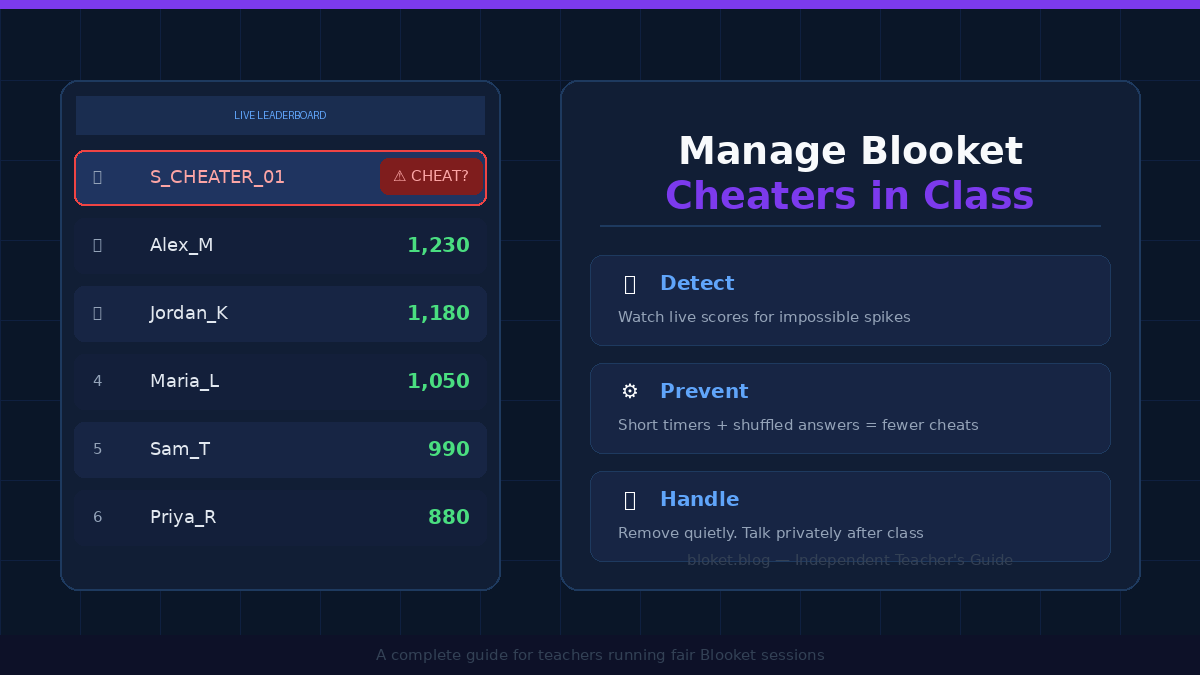
Keep your host dashboard open and watch the leaderboard refresh. A student using an auto-answer script will typically reach hundreds or thousands of coins within the first two to three minutes — a pace that is physically impossible through normal play. In a standard Blooket game where answering correctly, processing the result, and moving to the next question takes at least five to ten seconds per cycle, a student accumulating coins at two or three times the fastest legitimate player’s pace is a clear signal.
Also watch for perfect accuracy across every single question. Blooket question sets typically include plausible distractors that trip up even prepared students. A 100% accuracy rate across 20 or more timed questions in a competitive mode is unusual and worth investigating.
Behavioral signs in the room
Step back from your own screen periodically and scan the room. Students who are cheating often show one or more of these signs:
- Hands below desk level or frequent glances downward (phone)
- Repeated tab switching or a browser with multiple open tabs visible
- Eyes moving toward a neighbor’s screen rather than their own
- Completing each round visibly faster than peers with no visible reaction to the question content
No single sign is proof, but two or three together warrant a closer look.
Reading the post-game results
After the game ends, Blooket’s results summary shows each player’s final score. A student with a dramatically higher total than everyone else is worth a follow-up. If the score is arithmetically impossible — well above what the game mode could produce in the actual time available — you have a data point that is hard to argue with.
Settings and strategies that prevent cheating before it starts
The most effective approach is configuring games so common cheats become impractical before the first question loads.
Shorten timer settings
Blooket lets you set a per-question time limit when you build or edit a set. Short timers — five to eight seconds — leave almost no time to Google an answer or wait for a script to process. Timers of 30 seconds or more create a comfortable window for every common cheating method. Keep timers under 15 seconds for recall-based questions, and reserve extra time only for questions that genuinely require calculation or close reading.
Shuffle questions and answer order
When you enable question shuffling and randomize answer choice order in your set settings, two students sitting side by side may see the same question but with options in a completely different sequence. Our step-by-step guide to creating a Blooket quiz shows where these set settings live. Copying “B” from a neighbor becomes useless when their “B” is a different answer from yours.
Require students to log in
If your school connects Blooket through Google SSO or Clever, require students to sign in before joining. Logged-in play ties scores to a real account tied to a real student identity. Anonymous guest names give cover; real names reduce risk-taking. Even without a school integration, asking students to use their actual name when joining raises accountability.
Choose game modes strategically
Some Blooket modes are harder to exploit at scale. Tower of Doom and Crazy Kingdom involve multi-round decision-making where raw coin accumulation from a script is less dramatic and less obviously rewarding. Modes like Gold Quest and Racing have simpler linear scoring that makes a cheating gap very visible — useful for detection, but also a cleaner target for scripts. Using a more decision-layered mode occasionally disrupts the patterns students learn to exploit.
Control the join window
Set the game to private before creating it. Share the code verbally in the room, not posted on a shared screen or sent through a public channel. Once all students are in, close the join window. This prevents name flooding, outside participants, and the possibility of students sharing the code with someone not in class. Our guide on whether Blooket is safe for students covers the same code-sharing and privacy habits in more detail.
What to do when you catch a cheater mid-game
Catching cheating during a live session creates a split-second decision: act publicly and risk embarrassing a student and disrupting the class, or delay and let it continue.
Remove the player from the game quietly
As the host, you can remove a player from an active game through the host dashboard. Click the student’s name in the player list and select the option to remove them. Their screen will show a disconnection message. The rest of the class continues playing without interruption.
Do this without announcing it. Walk to your device, make the change, and continue the session. Deal with the conversation after class.
Handle it privately, not publicly
Calling a student out in front of 25 classmates produces defensiveness, not honesty. After class, show the student their score data and ask them directly to explain how they achieved it. Specific numbers are harder to dismiss than general accusations. Keep the conversation focused on the practice they missed rather than framing it primarily as a rules violation — the learning loss is the real consequence.
Document the incident
If the situation is serious enough to involve parents or administration, write down what you observed at the time: the student’s score, the time frame, the game mode, and what you saw on their screen or in their behavior. The post-game results page can be screenshotted as supporting evidence.
Long-term classroom policies that reduce repeat cheating
Single conversations rarely change behavior over time. What works is structuring the environment so cheating in Blooket is less tempting.
Stop grading Blooket scores
The largest single driver of cheating is a grade attached to the outcome. When students know their coin total or leaderboard position affects their mark, some will do whatever it takes to win. Switch to participation credit: a student who plays the full game on task earns full credit, regardless of score. This removes the reward for cheating while keeping the competitive energy that makes Blooket worth using.
Frame Blooket as practice, not an evaluation
Position every game explicitly as formative: this is practice, not a test. When students understand the game is for their own benefit — to identify what they still need to study — the pressure to cheat drops. Say this out loud before every session. Repeat it.
Set clear expectations before every game
Take two minutes before each game to state the rules: no scripts, no phones, no copying, no outside tabs. Our Blooket classroom rules guide turns these into a short, postable set of expectations. Then follow through every time you see a violation. Consistent low-key enforcement builds a clearer norm than any detailed rule list that is never enforced.
Use results to adjust your teaching
Review the post-game data after each session. When most of the class misses the same two or three questions, use that in your next lesson. When students see that their game performance shapes what you actually teach, they understand that playing honestly has a direct benefit to them.
Common mistakes teachers make when dealing with Blooket cheaters
Expecting Blooket to catch cheating automatically
Blooket has no built-in cheat detection. The platform cannot flag a console script, identify a student looking at a neighbor’s screen, or track outside tab usage. Detection is entirely on the teacher — watching the dashboard, scanning the room, and reviewing scores after the game ends.
Treating it as harmless because it’s “just a game”
Low-stakes environments are where academic habits form. A student who faces no consequence for cheating in review games learns that the behavior is acceptable, and that logic transfers to graded work. Addressing it early, even briefly and gently, sets the standard.
Making the response disproportionately punitive
A lengthy punishment for cheating in a Blooket session can damage the student relationship and shift attention away from the real issue. A private conversation, a removed credit for that session, and a clear explanation of what they missed is proportionate for a first incident. Formal consequences are appropriate for repeated or escalating behavior.
Posting the game code where outsiders can see it
Sharing the code through a school social media group, a public class blog, or a student Discord accessible to non-class members opens your game to participants you cannot monitor or remove easily. Share codes only inside the classroom, only verbally or through a locked LMS post.
FAQs
Can Blooket detect cheating on its own? Blooket does not have built-in cheat detection. The platform cannot flag auto-answer scripts, score spikes, or students copying each other’s screens. Teachers need to monitor the live dashboard and observe the room actively during games to catch most forms of cheating.
What are auto-answer scripts and how do they work? Auto-answer scripts are short programs students paste into their browser’s developer console. The script reads the correct answer from the game’s underlying code and selects it automatically, usually in under a second. This produces impossible answer speeds and very high coin totals that stand out on the leaderboard if you know what normal scores look like.
Can I remove a cheating student from a live Blooket game? Yes. As the host, you can click a player’s name in the dashboard during a live game and remove them. Their screen shows a disconnection message, and the rest of the game continues without interruption. You can address the situation with the student privately after class.
Which Blooket game mode is hardest to cheat in? Tower of Doom and Crazy Kingdom involve multi-round decision-making that makes raw coin-farming through a script less effective and less visually obvious. No mode is cheat-proof, but modes with layered mechanics are harder to exploit than single-score linear modes.
Should I grade Blooket game scores? Most experienced teachers recommend against grading Blooket scores directly, because it creates the incentive to cheat. Participation credit — rewarding students for playing on task throughout the game regardless of score — works better and keeps the game honest and low-pressure.
How do I stop outsiders from joining my Blooket game? Set the game to private before creating it, share the code only verbally inside the classroom, and close the join window once all your students are in. Avoid posting the code anywhere public. These steps prevent name flooding and uninvited participants in nearly every case.
What should I say to a student I caught cheating? Keep it private and evidence-based. Show them their score data, describe what you observed, and ask them to explain how they achieved the result. Most students respond better to a calm, specific conversation than a public accusation. Focus on the practice they missed rather than leading with punishment.
Is it worth reporting Blooket cheating to parents? For a first, low-level incident — a student copying a neighbor’s screen — a brief private conversation is usually enough. Escalate to a parent contact if the behavior repeats, if a student used a script that suggests premeditation, or if the cheating affected grades. Document what you observed before making that contact.
Conclusion
Managing Blooket cheaters in class comes down to three things: smart setup before the game, active monitoring during it, and calm private follow-up when something goes wrong. None of it requires specialized tools or complex systems.
Start with one concrete change at your next session: remove the grade from the Blooket score and switch to participation credit. That adjustment alone removes the biggest motivation for cheating and lets the game do what it is actually built for — giving students meaningful, low-pressure retrieval practice. Everything else falls into place more easily from there.
Find your edge with pro tips—battle-tested advice from real practitioners.