Blooket vs Kahoot: Which Quiz Tool Wins for Your Class
Both platforms put questions on screen and students on their phones — but the experience each one creates is fundamentally different. Kahoot gives you speed and instant energy. Blooket gives you strategy and replayability, and a virtual economy that keeps students invested long after a single game ends. Choosing between them comes down to what you actually need from a quiz tool. This guide covers every major difference so teachers and students can pick the right platform — or learn when to use both deliberately.
What Blooket and Kahoot actually are
Kahoot’s engagement is immediate. The countdown timer, the music, and a visible shared leaderboard create a spike of competitive energy within the first thirty seconds.
How Blooket works
Blooket wraps quiz questions inside multiple distinct game modes, each with its own rules and strategy. Students earn in-game currency, collect virtual characters called blooks, and compete through mechanics that go well beyond “answer fast, score points.” A single question set can run across more than a dozen different modes — and each one feels like a different game entirely. Tower Defense, Gold Quest, Factory, Cafe, and Fishing Frenzy each add a layer of decision-making that sits on top of the quiz content.
How Kahoot works
Kahoot runs one core format: multiple-choice questions displayed on a shared screen, with students racing to answer correctly and quickly. A leaderboard appears after each question. The faster a correct answer comes in, the more points the student earns. Setup takes under two minutes, the format is familiar to almost every student, and the energy it creates is immediate and loud.
Head-to-head: features that matter in class
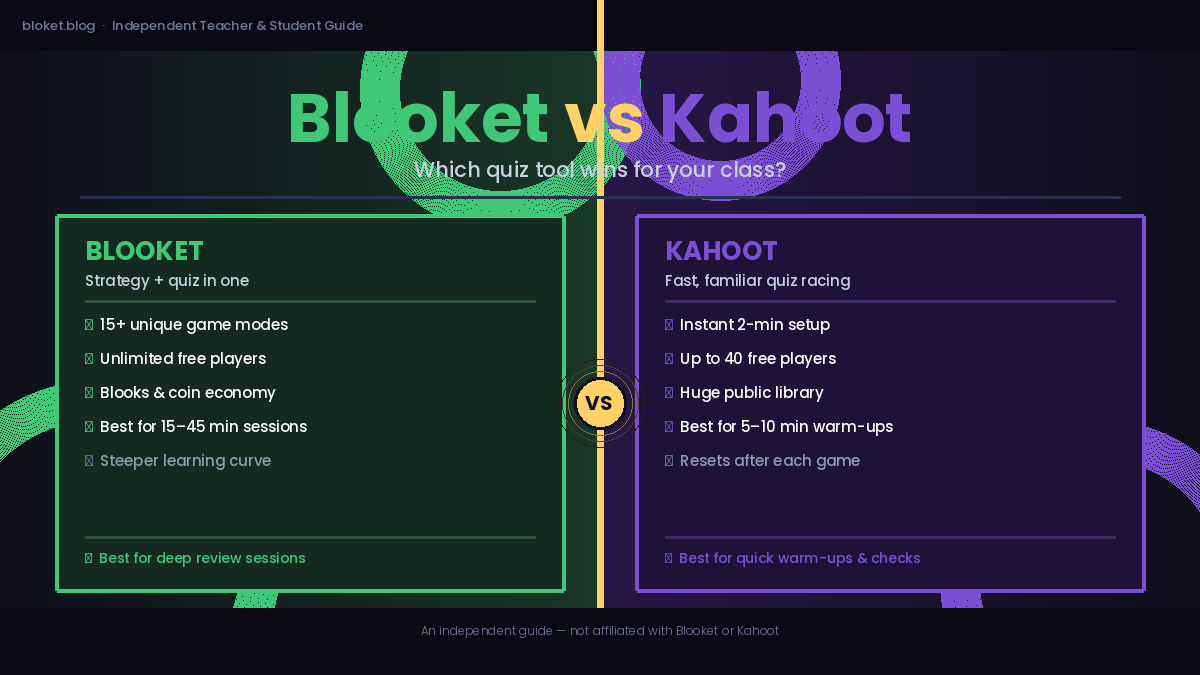
| Feature | Blooket | Kahoot |
|---|---|---|
| Game modes | 15+ distinct modes | 1 core format + variants |
| Student accounts | Optional (guest join available) | Optional (guest join available) |
| Free tier player limit | Unlimited (hosted) | Up to 40 players |
| Public question library | Large, growing | Very large, established |
| In-game economy | Yes (coins, blooks, XP) | No |
| Homework/async mode | Yes | Yes |
| Per-question reports | Yes | Yes |
| Paid plan required for basics | No | No |
| App required | No (browser-based) | No (browser + optional app) |
Game variety
Blooket’s multiple game modes are its biggest differentiator. Tower Defense asks students to use earned resources to build defenses while answering questions. Gold Quest involves stealing gold from opponents with correct answers. Factory turns question accuracy into a production rate for generating income. These mechanics mean a single question set stays fresh across multiple sessions because the experience changes completely each time.
Kahoot added team modes and a challenge format over time, but the underlying experience is always the same race-to-answer structure. That consistency is part of Kahoot’s appeal — and also its ceiling.
Student engagement mechanics
Kahoot’s engagement is immediate. The countdown timer, the music, and a visible shared leaderboard create a spike of competitive energy within the first thirty seconds. The problem is that this energy has a short half-life. Sessions running longer than ten minutes start to lose students who have fallen behind, because there is no mechanical reason to keep trying once the leaderboard gap widens.
Blooket’s engagement runs at a different level. Because game outcomes depend on strategy and chance as much as quiz accuracy, students who are behind on questions can still win a game through smart resource decisions. A student in last place on a Tower Defense board can still win by spending coins on the right defenses. That keeps more of the room invested for longer.
Teacher setup and customization
Setting up a live game on either platform takes under two minutes once a question set exists. Kahoot has a slightly simpler editor and a longer-established public library. Blooket’s editor is equally clean, and its library covers most subjects at most grade levels. The one extra step in Blooket is choosing a game mode before launching — a choice that matters, which is why it is worth spending two minutes learning what each mode does before your first session.
Pricing: what the free tier actually gives you
Neither platform requires a paid plan to run effective classroom games. Blooket’s free tier includes all game modes, the full question editor, and unlimited players in hosted sessions. Kahoot’s free tier covers up to 40 players per live game, the core question editor, and access to the public library. Both platforms offer paid subscriptions that unlock deeper analytics, additional features, and expanded reports — but the core classroom experience is available to every teacher for free.
Which platform works better by use case
Neither tool is universally better than the other. The right choice depends on what a specific session actually needs.
For quick formative checks (5–10 minutes)
Kahoot wins here. Setup is instant, the format is familiar, and the competitive energy peaks fast. When you want a three-minute vocabulary check before moving into a lesson, Kahoot delivers it without friction. Students do not need to understand any game mechanics — they just answer.
For longer review sessions (15–45 minutes)
Blooket wins by a clear margin. Its game modes sustain attention in ways that a single Kahoot format cannot. Running the same 20-question set as a Blooket Factory session versus a standard Kahoot reveals a measurable difference in how many students stay actively engaged past the midpoint. The game mechanics give students something to do between questions rather than waiting for the next prompt.
For student motivation over time
Blooket’s economy — coins, blooks, XP, and unlockable characters — creates ongoing reasons to participate beyond any single game. Students who play Blooket regularly build genuine attachment to their blook collections and return to sessions partly because of that investment. Kahoot resets completely after every game. There is nothing to carry forward, which means external motivation has to be rebuilt from scratch each time.
For different grade levels
Kahoot works well from around grade 3 upward. Younger students find the countdown timer and shared display exciting and easy to follow. Blooket’s game modes introduce more complexity — Factory and Tower Defense especially — so they land better with students in grade 5 and up. For younger learners, Blooket’s simpler modes like Classic or Racing work well, but teachers should walk through the interface with students at least once before the first competitive session.
For subject variety
Both platforms work across subjects. Math, science, history, vocabulary, and foreign language all run equally well on either platform. The subject itself does not tip the balance — the session format and length do.
Common mistakes teachers make when choosing
Choosing based on name recognition alone
Kahoot is the more recognized brand, especially for teachers new to edtech. But recognition is not the same as fit. A teacher whose class is disengaging from Kahoot’s format may get significantly more out of switching to Blooket for review sessions — not because Blooket is newer or trendier, but because a different mechanic re-engages students who have gone passive.
Underestimating Blooket’s brief learning curve
Blooket is not hard to use, but it has more moving parts than Kahoot. Teachers who launch a Blooket game without explaining the mode’s rules to students first often find the session chaotic. Two minutes of upfront explanation — “in Tower Defense, you use the coins you earn from correct answers to build defenses against waves of enemies” — makes the difference between a confusing session and one students ask to repeat.
Ignoring student preference and prior experience
Some classes have been playing Kahoot since primary school and find it comfortable and genuinely fun. Introducing Blooket without giving students time to explore it in a low-stakes context can create resistance to the new format. The most effective approach is to run Blooket as a free-play or ungraded session first, so students learn the mechanics before the competitive stakes are added.
Using one platform for everything
The teachers who get the most out of both platforms use them for different jobs. Kahoot handles quick warm-ups and exit tickets. Blooket handles full review sessions and end-of-unit games. Treating them as interchangeable rather than complementary tools misses most of what each does well.
FAQs
Is Blooket or Kahoot better for teachers? It depends on what the session needs to accomplish. Kahoot is better for short, high-energy checks under ten minutes. Blooket is better for longer review sessions where sustained engagement matters. Many teachers use both — Kahoot for daily warm-ups and Blooket for unit reviews — and get more from each as a result.
Is Blooket free to use? Yes. Blooket’s free tier includes all game modes, unlimited players in hosted games, and the full question editor. A paid Plus plan exists and adds features like extended stats and priority support, but it is not required to run effective classroom games.
Can students join Blooket and Kahoot without creating an account? On both platforms, students can join a live hosted game as a guest without an account. On Blooket, having an account lets students save their blook collection and track progress across sessions. On Kahoot, an account lets students access challenges and saved results. Guest joining works fine for one-off sessions on either platform.
Which platform has the better public question library? Kahoot’s public library is older and larger by volume. Blooket’s library has grown substantially and covers most subjects at most grade levels. For common topics — state capitals, multiplication tables, biology vocabulary — both libraries have strong options. For niche or advanced subjects, Kahoot’s library edges ahead simply because more teachers have contributed to it over a longer period.
Does Blooket work on Chromebooks and tablets? Yes. Blooket runs entirely in a browser and works on any device with internet access — phone, tablet, Chromebook, or laptop. No app download is required. Kahoot also runs browser-based and has dedicated iOS and Android apps for students who prefer them.
Can I use both Blooket and Kahoot in the same class? Absolutely, and many teachers do. Using both gives students variety and prevents the engagement drop that comes when any single format becomes entirely predictable. A common pattern is Kahoot for Monday warm-ups and Blooket for Thursday review games.
Which platform gives better data on student performance? Both platforms generate per-question accuracy reports after a session. Kahoot provides downloadable spreadsheet exports on its free tier. Blooket shows post-game summaries with question-level breakdowns. Both platforms offer expanded analytics on their paid plans, including individual student progress over time.
Conclusion
Blooket and Kahoot solve different problems. Kahoot is the fastest tool for a quick, high-energy check-in that needs zero explanation and delivers results in under five minutes. Blooket is the stronger choice when you need students actively engaged for a full review session without losing the back half of the room to disengagement. The teachers who get the best results use both tools deliberately — not interchangeably. Start by identifying what your next session actually needs, then pick the platform built for that job. If you are new to Blooket, run one game in Classic mode this week and see how your class responds before building it into your regular rotation.
Boost your daily output with highly actionable guides—gain practical takeaways you can implement immediately at work.