Blooket Plus vs Other Paid Tools: Which Is Worth It?
Every teacher eventually hits the same wall: the free plan is decent, but the paid options look tempting — and there are a lot of them. Blooket Plus sits alongside Kahoot!, Gimkit, Quizlet Teacher, and Quizizz paid plans, all promising better engagement and more classroom control. This guide breaks down exactly what each subscription delivers, where the real value sits, and which tool is worth spending money on based on what you actually need in your classroom.
What does Blooket Plus actually include?
Blooket Plus is the premium subscription tier for Blooket, designed for teachers who want greater hosting capacity, richer student data, and stronger classroom workflow tools. The free plan is already unusually generous, which makes evaluating Plus more nuanced than with most EdTech platforms.
Features unlocked with a Plus subscription
The most immediately impactful upgrade is the player cap. Free accounts can host up to 60 players per session; Plus raises that ceiling to 300. For teachers running school-wide review events, cross-class tournaments, or large-group test prep sessions, that difference is significant.
Beyond player count, Plus teachers get access to detailed question-level reports — not just total scores, but a breakdown of how each student performed on each individual question. In practice, this data is genuinely useful for formative assessment: you can see which content gaps are systemic across the class versus isolated to individual students, and adjust the next lesson accordingly.
Plus accounts also include early access to new game modes before they release to free users, priority support, the ability to duplicate and share question sets without restrictions, and the option to reduce Blooket branding in hosted games. The assignment tools — which let teachers assign games as homework with set deadlines and track completion rates — are unlocked at the Plus tier as well.
One smaller but appreciated perk: Gold Box odds improve for Plus teachers’ sessions. Students get slightly better blook drop rates during gameplay, which adds a tangible motivation boost for students who care about their blook collection.
What the free plan still covers
Blooket’s free tier is one of the most complete no-cost offerings in the EdTech games space. Free users can create unlimited question sets, host any game mode available to free accounts, join any game, earn and spend coins, collect blooks, and access the full blook shop.
The 60-player cap rarely becomes a problem in a typical classroom of 25 to 35 students. Most game modes available on free are the same modes students enjoy most. Many teachers run Blooket sessions for a full school year without ever feeling the ceiling. That context matters when evaluating Plus: you are not paying to unlock a crippled product — you are extending something that already works.
How do other paid classroom tools compare?
Blooket is not the only platform offering a premium tier. Kahoot!, Gimkit, Quizlet, and Quizizz all have paid plans targeting teachers and institutions, and each takes a different approach to what gets locked behind a paywall.
Kahoot! paid plans
Kahoot! offers multiple paid tiers for individual teachers — Plus, Pro, and Premium — along with separate school and district licensing. The paid plans unlock slide-based content importing, expanded question banks, advanced reporting dashboards, team modes, and larger player counts. Higher tiers also integrate with LMS platforms like Google Classroom and Canvas, which matters for schools already embedded in those ecosystems.
Where Kahoot! falls short compared to Blooket is in the free experience. Kahoot!’s no-cost plan is noticeably more restricted: question types are limited, student reports are minimal, and branding is heavy throughout. Teachers comparing free tiers will find Blooket’s no-cost offering considerably richer. Paying for Kahoot! is more of a necessity for full functionality — whereas Blooket’s free plan already delivers most of what everyday classroom use requires.
Game-mode variety is also narrower on Kahoot!. The core format is quiz-and-buzz, with some team and challenge variations. Teachers who want to shift game mechanics based on content type will find fewer options than Blooket provides.
Gimkit
Gimkit built its reputation on an in-game economy mechanic where students earn and spend virtual currency based on correct answers. That single design decision changes the dynamic from racing to strategic gameplay, and it keeps sessions engaging in a way that feels different from other tools. The mechanic works particularly well for content that benefits from repetition, since students stay motivated to keep answering.
The problem is the free plan. Gimkit’s no-cost tier is the most restrictive in this group: free users can host only a limited number of games per month and cannot access most game modes. Using Gimkit regularly in a classroom effectively requires Gimkit Pro — unlike Blooket, where the free tier genuinely sustains regular use.
Gimkit Pro unlocks unlimited hosting, all game modes including Kit Collab, Humans vs. Zombies, and Blastball, plus progress tracking and assignment tools. The per-month cost tends to run higher than Blooket Plus. For teachers drawn specifically to the economy mechanic, Gimkit Pro delivers that experience fully. But the variety of modes is narrower than Blooket’s, and students who play frequently will notice the repetition over a full school year.
Quizlet Teacher
Quizlet operates differently from every other tool in this comparison. Its foundation is self-study: flashcard sets, learn mode, adaptive practice tests. Quizlet Teacher adds class folders, an ad-free student experience, detailed tracking of study activity, and the ability to see which students have worked through which sets independently.
Quizlet Live exists and it works as a classroom activity, but it is a secondary feature. The session energy and game variety are lower than what Blooket or Gimkit generate. Where Quizlet Teacher earns its value is in the student-led study loop between classes: students return to sets on their own, the platform adapts to their weak areas, and teachers can see that activity in their dashboard.
For vocabulary-intensive subjects, blended learning models, or flipped classroom setups, Quizlet Teacher is the strongest match in this group. For live classroom game engagement, it is the weakest.
Quizizz paid plans
Quizizz offers one of the most capable free tiers in this comparison, rivaling Blooket’s. Free users can run live games, assign homework, access basic reports, and use most question types without a subscription. The paid upgrade adds standards alignment tagging, enhanced analytics, premium visual themes, teleport mode, and an ad-free student experience.
The standards-tagging feature is Quizizz’s most distinctive paid differentiator. Teachers can map individual questions to specific curriculum objectives and pull class-level mastery reports filtered by standard — something no other tool in this group handles as cleanly at the teacher tier. For schools where formative data has to document curriculum alignment, that feature alone justifies the upgrade.
Quizizz also uses meme-based feedback between questions, which many students respond to well. The overall classroom feel is more quiz-paced than Blooket’s game-paced experience. Both approaches work, but they suit different classroom personalities.
Side-by-side comparison of features and value
This table covers the most-compared features across all five platforms, showing what each offers at the free and paid tiers.
| Feature | Blooket (Free) | Blooket Plus | Kahoot! (Paid) | Gimkit Pro | Quizlet Teacher | Quizizz (Paid) |
|---|---|---|---|---|---|---|
| Max live players | 60 | 300 | Varies by tier | Unlimited | Unlimited | Unlimited |
| Game mode variety | High | High | Low–medium | Medium | Low | Medium |
| Student progress reports | Basic | Detailed | Advanced | Yes | Yes | Advanced |
| Homework/assignment mode | No | Yes | Yes | Yes | Yes | Yes |
| Ad-free for students | Yes | Yes | Yes | Yes | Yes | Yes |
| In-game economy mechanic | Yes | Yes | No | Yes | No | No |
| Curriculum standards alignment | No | No | Partial | No | No | Yes |
| LMS integration | No | No | Yes (higher tiers) | No | Partial | Yes |
| Free plan generosity | Very high | — | Low | Very low | Medium | High |
| Relative cost per teacher | Free | Low–mid | Mid–high | Mid–high | Low–mid | Low–mid |
Pricing varies by region, billing cycle, and plan level. Always verify current rates and Blooket Plus pricing on each platform’s official pricing page before purchasing.
Which tool fits which classroom need?
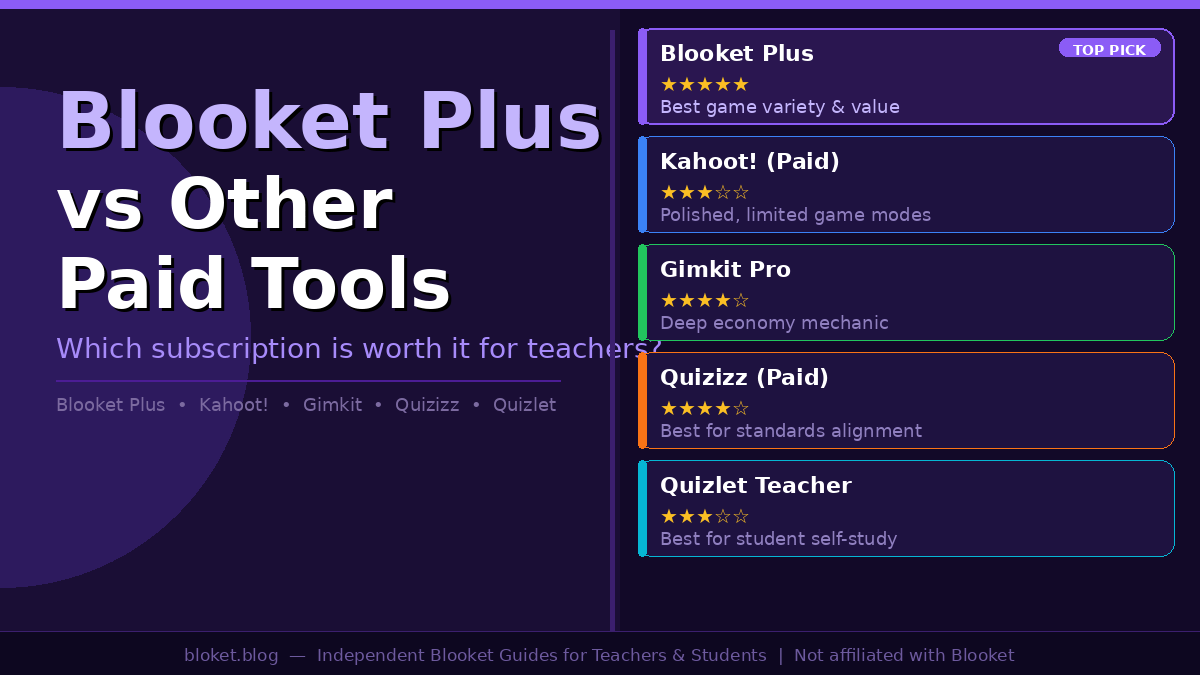
The right paid subscription depends on how you actually run your classroom, not which feature list looks longest on paper. After testing each platform across different session types, a few patterns become clear.
Best for live engagement and game variety
Blooket Plus is the strongest option here. The range of game modes — Tower Defense, Gold Quest, Battle Royale, Crypto Hack, Factory, Racing, and others — means you can match the game format to the type of content being reviewed. A vocabulary warm-up plays differently in Tower Defense than a math fact drill does in Gold Quest, and that flexibility keeps repeated sessions from feeling identical.
Gimkit Pro is the closest rival in this category. Its economy mechanic generates genuine strategic engagement, and the session energy is high. But the mode variety is narrower, and across a full school year, Blooket holds up better under repeated use without students burning out on the format.
Best for curriculum alignment and standards tracking
Quizizz paid is the clear choice here. Its standards-tagging system lets teachers map individual questions to curriculum objectives and pull class-level mastery data filtered by standard — the kind of documentation that satisfies assessment requirements in schools tied to formal curriculum frameworks. Kahoot! offers alignment features in its higher-priced tiers, but Quizizz delivers this more consistently and at lower cost per teacher.
Best for student self-study outside class
Quizlet Teacher leads this category. Students access study sets independently, work through adaptive practice modes, and the platform adjusts difficulty based on individual performance. Blooket Plus supports assignment mode so students can complete games as homework — and that works well — but the independent study experience is more structured and persistent on Quizlet. For subjects that rely on vocabulary acquisition or content retention between lessons, Quizlet handles the out-of-class side better than any tool in this comparison.
Best overall value across use cases
For teachers whose primary use case is live classroom review, Blooket Plus delivers the strongest balance of game variety, player capacity, reporting depth, and cost. The step from free to Plus is meaningful without being dramatic — most of what makes Blooket effective already exists on the free tier, and Plus extends that capability for teachers who’ve hit the ceiling of the free plan. For whole-school deployments, Quizizz and Kahoot! offer institutional licensing paths worth evaluating alongside Blooket’s individual-teacher pricing.
Mistakes teachers make when picking a paid plan
Spending money on the wrong EdTech subscription is easy, especially when free trials run short and every platform markets itself as essential. These are the decisions most likely to go wrong.
Paying for features the free plan already covers
Blooket’s free tier is unusually capable, and so is Quizizz’s. Teachers hosting classes under 60 students, without a need for question-level analytics, and not using homework assignment mode, may have no practical reason to upgrade. The same logic applies across the board: write down the specific features you would gain with a paid plan, then ask honestly whether you would use them every week. If the answer is rarely or never, the free tier is the right call.
Choosing by brand name instead of fit
Kahoot! is globally recognized in a way no other tool here can match. That recognition creates a pull toward it, but familiarity does not mean the best fit. Kahoot!’s free plan is more restrictive than Blooket’s or Quizizz’s, and the paid plans cost more while delivering less game-mode variety. Teachers new to classroom games often default to Kahoot! and later discover they are paying more for a less flexible experience. Try the tools your students respond to, not the one you already know the name of.
Ignoring how students actually engage
The most important variable in any EdTech subscription is whether students want to use it repeatedly. Blooket’s game modes sustain engagement over longer sessions because students are operating inside a game mechanic, not simply racing to answer first. Gimkit works similarly. Quizlet Live, by contrast, tends to feel slower in an energetic classroom setting. Running a free trial of two or three platforms with actual students before purchasing a subscription is the most reliable way to make a confident decision.
Skipping institutional licensing when it applies
Individual teacher plans make sense for one classroom. For whole-school adoption, the math changes. Kahoot! and Quizizz both offer institutional licenses covering multiple teachers, with admin dashboards and LMS integration. Blooket’s pricing is designed primarily for individual teachers, which makes it a strong individual purchase but a less obvious fit for large-scale rollouts without exploring what Blooket offers at the school plan tier.
FAQs
Is Blooket Plus worth it for a single teacher? For teachers who regularly host sessions approaching or exceeding 60 students, need question-level performance reports, or want to assign games as graded homework with deadlines, Blooket Plus adds real value. If your classes are small, analytics aren’t a priority, and you aren’t using assignment mode, the free plan covers daily classroom use well enough to hold off on upgrading.
Can students pay for Blooket Plus themselves? Blooket Plus is a teacher-facing subscription that affects how a game is hosted. Students do not need a paid account to join any Blooket game, earn blooks, or access the shop. The Plus benefits — larger player capacity, detailed question reports, assignment tools — live entirely on the teacher’s side and require no student payment whatsoever.
Which platform is cheapest for an individual teacher? Blooket Plus and Quizlet Teacher tend to be among the most affordable individual-teacher subscriptions in this group, with Quizizz close behind. Gimkit Pro and Kahoot! paid tiers are typically priced higher per month. Pricing changes and varies by region, so always verify current rates on each platform’s official pricing page before committing.
Does Blooket or Gimkit give students a better in-session experience? Both platforms use an economy mechanic that keeps students invested beyond simple quiz racing. Blooket’s broader variety of game modes gives it more replay value across a school year. Gimkit’s economy is arguably deeper in any single session. Teachers who use both report that Blooket holds up better over repeated use, while Gimkit shines in high-energy, shorter bursts where the strategic currency system is the main hook.
Is Quizlet better for live games or self-study? Quizlet is primarily a self-study tool, and that’s where it outperforms every tool in this comparison. Quizlet Live works as a live classroom activity, but it doesn’t match the engagement levels that Blooket or Gimkit generate. If live classroom gaming is your primary goal, Quizlet Teacher should not be your first purchase — pair it with a live-game-focused platform if you want both functions well covered.
Can I subscribe to more than one platform at once? Yes, and many teachers do. A practical approach is maintaining one paid live-game subscription — Blooket Plus or Quizizz — and using Quizlet’s free tier for student self-study sets. There is no requirement to commit to one platform, and the free tiers of Blooket and Quizizz are capable enough that partial paid setups make genuine economic sense.
What happens to Blooket Plus features if the subscription lapses? When a Blooket Plus subscription ends, the account returns to the free plan limits. All question sets and game history remain in the account, but Plus-only features — the 300-player cap, detailed question-level reports, homework assignment mode, and early access to new game modes — become unavailable until the subscription is renewed.
Conclusion
Blooket Plus vs other paid tools is not a question with one universal answer. For live classroom review sessions with variety and strong student engagement, Blooket Plus delivers the best overall balance of game range, player capacity, reporting depth, and cost. For curriculum standards documentation, Quizizz paid has the clearest edge. For student self-study between lessons, Quizlet Teacher fills a gap the others don’t.
The most practical starting point: run each tool’s free plan for a full term with your actual students. Track which platform they look forward to, and which paid features you keep wishing you had access to. That usage data will be more reliable than any comparison table. When you have it, the right subscription becomes obvious — and the spending decision makes itself.
Why waste time on fluff when substance awaits? Jump straight into our articles for pure, actionable value.