Get Blooket Plus Free Trial: Complete Step-by-Step Guide
Blooket Plus upgrades the free experience with tools teachers and students actually use — advanced hosting controls, exclusive blooks, and classroom analytics that go deeper than any default report. Before paying for a subscription, most people want to test it first. This guide walks through how to find and activate a Blooket Plus free trial, what you get during it, and what to ask yourself before the billing date arrives.
What is Blooket Plus and what does the free trial give you?
Blooket Plus is Blooket’s paid subscription tier. A free trial gives you temporary full access to every Plus feature so you can test the upgrade before any money changes hands. Blooket’s free account is already functional for hosting, joining, and building question sets — Plus adds a layer on top of that aimed at players and teachers who use the platform regularly.
Features unlocked during a Plus trial
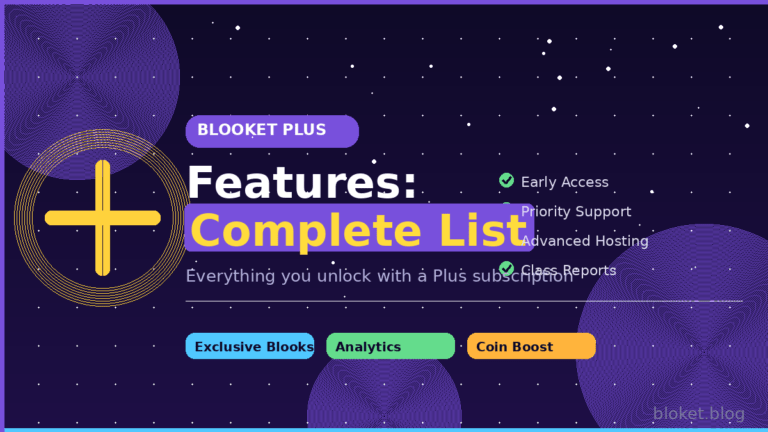
During the trial window, you have access to every feature the paid tier includes:
- Exclusive blooks: A rotating catalog of cosmetics unavailable through the standard free box system, including higher rarity tiers not in the regular drop pool.
- Enhanced hosting controls: Set custom timers per question, toggle specific game mechanics for each session, and adjust game length settings beyond the free defaults.
- Early game mode access: Blooket releases new modes to Plus subscribers as early-access features before they reach free accounts.
- Question-level analytics: Teachers can pull per-question accuracy data after each game — not just a class average, but a breakdown showing which specific questions caused the most errors.
- Advanced set management: Duplicate question sets in one click and manage sharing permissions with more granular controls.
- Profile customization: Banner options and display extras beyond the default free account appearance.
What stays free after the trial ends
Once the trial expires, your free account remains exactly as it was. Coins, standard blooks, question sets, and full game history carry over. Hosting games, joining with a code, and building sets all stay available. The only change is losing access to the Plus-exclusive features listed above.
How to get your Blooket Plus free trial
The steps below apply when a free trial offer is actively visible on your account. Blooket doesn’t run a permanent open-enrollment trial — availability depends on account eligibility and promotional windows, with newer accounts more likely to see an offer. Check the Plus page after logging in to confirm one is available before starting.
Step 1: Log in to your Blooket account
Go to blooket.com and sign in with your existing account. If you’re creating one now, use the email address you plan to keep long-term — subscription confirmations and billing reminders go there. The trial is tied to the account, not the device.
Step 2: Open the Blooket Plus page
After logging in, click your profile icon in the top-right corner. Select “Blooket Plus” from the dropdown. This page shows your current plan status, the full feature list, and any trial or promotional offer currently attached to your account.
Step 3: Check for an active trial offer
The Plus page displays a free trial button when one is available for your account. If you see a button labeled something like “Start Free Trial,” it will show the trial length and the subscription price that activates after it ends. Both details appear before you click anything — read them carefully.
If there’s no trial button visible, your account may not qualify for one at this time. The direct path forward is either to check back during a future promotional period or subscribe at the standard rate.
Step 4: Activate the trial
Click the trial button and follow the checkout flow. Blooket typically requires payment details even for a free trial, so the subscription can begin automatically when the trial period ends. The checkout screen shows the exact billing date — note it before confirming.
After completing checkout, your account upgrades immediately. Plus features appear in your dashboard right away.
Step 5: Use the trial deliberately
The trial window is short, and waiting until the last day to explore Plus features wastes most of it. Make a plan on day one:
- Run at least two or three live games using the enhanced hosting controls.
- If you’re a teacher, use the analytics on a real class session to see whether the question-level breakdown is useful for your review process.
- Browse the exclusive blook catalog to decide whether the cosmetic additions matter to you.
- Check whether any early-access game modes are available and run them with a group.
Step 6: Cancel or continue before the billing date
If Plus doesn’t fit your needs, cancel before the billing date shown during checkout. Canceling during the trial period prevents any charge. If you don’t cancel, the subscription activates automatically at the full Plus rate.
To cancel: log in, open the Plus page, and find the subscription management or cancellation option. The process takes under a minute. Setting a calendar reminder the moment you activate the trial is the simplest way to avoid an unwanted charge.
Is Blooket Plus worth it after the trial?
After the trial, you’ll have used the features in a real context rather than just reading about them. The decision to continue depends almost entirely on how frequently and intensively you use Blooket.
For teachers
Plus delivers the most value for teachers running games several times per week with consistent classes. The question-level analytics change the post-game process meaningfully — instead of knowing that a class averaged 70%, you see which questions failed across the board, which helps direct the next review session.
Enhanced hosting controls also matter at scale. Being able to set per-question time limits stops a small group of fast readers from dominating every round and makes the game feel fairer for mixed-skill classes.
For teachers using Blooket once a month as a reward activity, the free account covers most of what’s needed.
For students
Student value from Plus is mainly cosmetic. Exclusive blooks and profile customization are the draws for players who invest in the collection side of Blooket. If the social element of displaying rare blooks matters in your school’s Blooket culture, Plus adds real variety.
If you play primarily to earn coins, compete in games, and enjoy the core loop, the free account doesn’t hold you back — gameplay mechanics are the same on both tiers.
Free vs Plus comparison
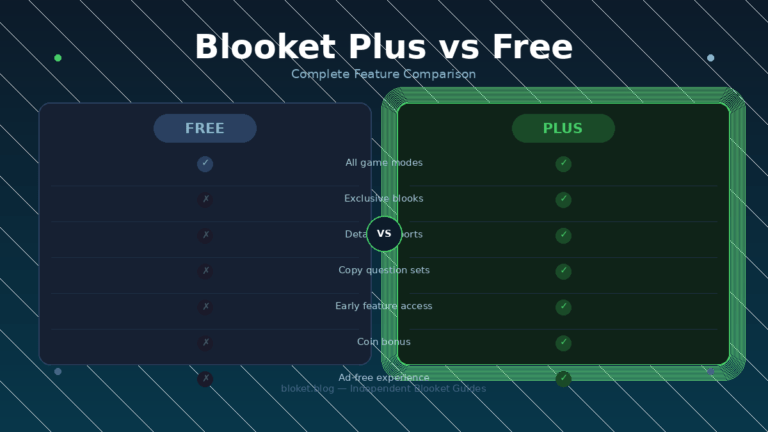
| Feature | Free account | Blooket Plus |
|---|---|---|
| Hosting games | Yes | Yes |
| Joining games | Yes | Yes |
| Building question sets | Yes | Yes |
| Standard blooks | Yes | Yes |
| Earning coins | Yes | Yes |
| Exclusive Plus blooks | No | Yes |
| Enhanced hosting controls | No | Yes |
| Question-level post-game analytics | No | Yes |
| Early game mode access | No | Yes |
| Profile banner customization | No | Yes |
| Advanced set duplication | No | Yes |
Common mistakes people make with the Blooket Plus trial
Not reading the billing terms at checkout
The most common problem is activating a trial without noting when it ends. Blooket’s checkout screen shows the billing date clearly — but many people click through without reading it. Add a phone calendar reminder for one day before the billing date the moment you activate. That gives you time to cancel if you’ve decided Plus isn’t worth it.
Using the trial to do what you already do for free
Some users activate Plus and spend the entire trial playing exactly as they always did. The trial is only useful if you test features that are actually behind the paywall. Prioritize analytics, exclusive blooks, and hosting customization — those are the specific features you lose when the trial ends. Testing them is the only way to know whether paying for them makes sense.
Assuming a trial is always available
Blooket does not offer a permanent, open-enrollment free trial for all accounts. Promotional windows come and go, and account eligibility plays a role. If the Plus page shows no trial option, one simply isn’t available for your account right now. Searching for unofficial methods claiming to give free Plus access is not a route worth taking — most are outdated, ineffective, or violate Blooket’s terms of service, which can get an account suspended.
Thinking Plus is only for teachers
The Plus feature set splits fairly evenly between classroom tools (analytics, hosting controls) and player-facing rewards (exclusive blooks, profile extras). Students who are invested in the cosmetics and collection side of Blooket have a genuine reason to run the trial. The trial is worth testing for either group — the useful features just differ.
FAQs
Does Blooket Plus always have a free trial? No. Blooket offers free trials on a promotional basis rather than as a permanent option. Newer accounts are more likely to see an offer. Log in and open the Plus page to check whether a trial is currently available on your account.
Do I need a credit card to activate the free trial? In most cases, yes. Blooket’s checkout typically requires payment details upfront so the subscription can begin automatically when the trial ends. You can cancel before that date to avoid any charge.
What happens to my blooks and coins if I cancel Plus? Nothing changes. Your coins, standard blooks, question sets, and full game history stay on your account after cancellation. You lose access only to the Plus-specific features listed in this guide.
Can students get Blooket Plus, or is it only for teachers? Both students and teachers can subscribe to Blooket Plus. Students primarily benefit from exclusive blooks and profile customization. Teachers get the most value from question-level analytics and enhanced hosting controls. The trial is worth running for either group.
How long is the Blooket Plus free trial? Trial length varies depending on when Blooket runs the promotion. Check the Plus page on your account for the exact duration shown at the time you activate — it’s always displayed before you confirm.
Can I get Blooket Plus features free without a trial? The only legitimate way to access Plus features at no cost is through an active free trial offer on your account. There is no permanent free version of Plus features, and unofficial methods claiming to bypass the subscription are unreliable and risk account suspension under Blooket’s terms of service.
What does Blooket Plus cost after the trial ends? Blooket charges a recurring subscription fee for Plus, available in monthly and annual billing cycles. Annual billing typically works out to a lower per-month rate. The current price is shown on the Plus page at blooket.com — this guide doesn’t quote a specific number because rates can change at any time.
Is the trial worth it for a single school unit? For a teacher wanting to test Plus for one unit, a free trial is the right move — activate it at the start of the unit, use the analytics and hosting tools across multiple sessions, then cancel before the billing date if you decide not to continue. The trial window is enough time to evaluate it across a realistic use case.
Conclusion
A Blooket Plus free trial is a low-commitment way to test whether the paid features actually change how you teach or play. Check the Plus page on your account for an active offer, activate it with the billing date clearly noted, use the trial on features you’d actually pay for, and cancel if the experience didn’t add enough. If the analytics and hosting tools improved how you run games, keeping Plus is a straightforward call. If the experience felt mostly the same as your free account, you haven’t lost anything.
Head to blooket.com, open the Plus page, and check whether a trial offer is showing for your account.
Stay relevant in a fast-changing world—check out our latest updates to keep your skills razor-sharp.