Blooket for Middle School Teachers: A Complete Guide
Middle school teachers face a unique challenge: students who are old enough to be bored by “baby” activities but young enough to still crave games and competition. Blooket threads that needle almost perfectly. It wraps curriculum review in fast-moving game formats that 6th, 7th, and 8th graders genuinely want to play — not because you told them to, but because losing to a classmate stings enough to keep them paying attention. This guide covers everything you need to set up, run, and extract real learning from Blooket in a middle school classroom.
What makes Blooket click with middle schoolers
Blooket works for middle school classrooms because it channels the competitive, social energy of this age group directly into content review. Students answer questions to earn in-game currency, steal from opponents, or defend towers — and every action ties back to a correct answer. The loop is tight enough that most 12–14-year-olds stay engaged for the full session.
The competitive streak that works in your favor
Middle schoolers are wired for social comparison. They want to know where they rank, who they beat, and whether their strategy outsmarted someone else’s. Blooket’s game modes feed that instinct in a controlled environment. Gold Quest lets students steal coins from each other. Battle Royale eliminates wrong-answer players one by one. Even quieter students tend to engage because the stakes feel real, even if the prize is digital.
Why this age group responds differently than elementary students
Elementary students often engage with Blooket purely for the blooks — the cute collectible characters. Middle schoolers care about those too, but the hook shifts toward competition and social standing. A 7th grader who wins a session will talk about it at lunch. That social currency doubles as a teaching tool. It also means classroom management needs a slightly different approach with this age group, which this guide covers in detail below.
How to set up Blooket as a middle school teacher
Setting up Blooket for the first time takes under 15 minutes. The platform is built around two roles: hosts (teachers) and players (students). Students never need an account to play a live game, which removes one of the biggest friction points in school tech rollouts.
Creating your account and first question set
Go to blooket.com and sign up with a teacher account using your school email. Blooket offers both free and paid (Blooket Plus) tiers — the free version is more than enough to start.
Once you’re in the dashboard, click “Create Set” to build your first question set. Each question supports multiple-choice answers, and you can attach images to both questions and answer choices. For middle school, image-based questions work particularly well for science diagrams, map identification, and reading passages.
Aim for 20–30 questions per set. Fewer than 15 means students see repeats too quickly, which kills the sense of fresh challenge. More than 40 tends to drag sessions past the engagement window.
Finding quality question sets in the Blooket library
Blooket has a public library of teacher-created question sets searchable by topic and grade level. Before building from scratch, search the library for your subject and filter by verified sets or sort by favorites. You’ll often find a usable set for common topics — 7th-grade ratios, Civil War basics, parts of speech — that you can duplicate and customize for your class.
Always preview a borrowed set before hosting. Public sets sometimes contain errors, regional spellings, or questions that don’t match your curriculum’s terminology. A five-minute review prevents mid-game confusion.
Hosting a live game step by step
- Open your question set and click “Host Live.”
- Choose a game mode (covered in detail in the next section).
- Set your game options, including time limits and the Name Approval feature. Enabling Name Approval routes all student-submitted usernames through your approval queue before they appear in the game — a setting worth turning on for middle school.
- Share the six-digit game code with your class. Students go to blooket.com/play or open the Blooket app and enter the code. No student account is needed.
- Once everyone has joined, click “Start” from your teacher dashboard.
- Monitor the live leaderboard on your projector while students play on their devices.
The full join process takes two to three minutes with a practiced class.
Best Blooket game modes for middle school classrooms
The best Blooket game mode for your class depends on your learning goal and available time. Gold Quest and Tower Defense drive the most sustained engagement for review sessions. Battle Royale works best as a short warm-up. Café and Factory fit better when you want lower-intensity practice.
Gold Quest: the crowd favorite
Gold Quest is the mode most middle schoolers ask for by name. Students answer questions to collect gold coins, then use bonus rounds to steal coins from classmates or multiply their own stack. The steal mechanic is what makes it sticky — a student in last place can flip the leaderboard in two questions if they hit the right power-up.
Best for vocabulary review, math fluency, and social studies content. Ideal session length is 15–20 minutes.
Tower Defense: for strategic thinkers
Tower Defense (and its variant Tower Defense 2) has students answer questions to earn in-game currency, then spend it building towers to stop waves of enemies. It’s less socially volatile than Gold Quest but rewards sustained focus and strategic thinking — two skills middle schoolers sometimes need explicit practice with.
Best for science content, units with many terms to differentiate, and topics where you want students to slow down and think carefully. Works well as a 20–25 minute activity.
Factory: sustained engagement over longer sessions
In Factory mode, correct answers speed up a virtual production line. Students compete to produce the most items by the end of the session. The mode lacks the dramatic reversals of Gold Quest, but it keeps students answering consistently rather than waiting for a big power-up swing.
Best for math practice sets, spelling, and any content where volume of practice matters more than high stakes.
Battle Royale: the fast warm-up tool
Battle Royale eliminates players who answer incorrectly or too slowly. Eliminated students can still watch the round play out, and the pressure to answer quickly makes it ideal as a 5–8 minute warm-up before a lesson. One wrong answer early isn’t devastating because the next round starts fresh.
Best for quick knowledge checks at the start of class and activating prior knowledge before a new unit.
Café: a calmer option
Café mode has students manage a virtual restaurant, using coins earned from correct answers to buy ingredients and serve customers. The competition is lighter and sessions feel less chaotic. Some middle school teachers use Café specifically for classes that get too activated during Gold Quest, or for end-of-day review when energy needs to stay managed.
Best for classes prone to overstimulation, end-of-period review, and individual practice sessions.
Game mode comparison
| Mode | Energy level | Best use | Ideal time |
|---|---|---|---|
| Gold Quest | High | General review, vocabulary | 15–20 min |
| Tower Defense | Medium | Science, term-heavy content | 20–25 min |
| Factory | Medium | Math, spelling, volume practice | 15–25 min |
| Battle Royale | High | Warm-ups, quick knowledge checks | 5–10 min |
| Café | Low-Medium | Calm review, end of period | 15–20 min |
Classroom management strategies that actually work
Running Blooket with middle schoolers is manageable with clear procedures. Skip the setup and you’ll spend the session refereeing coin-steal complaints.
Setting expectations before the game starts
State ground rules out loud every session, not just the first time. Our Blooket classroom rules guide has a ready-made set of expectations you can post and reuse. Middle schoolers need reminders. Three rules that hold up consistently:
Devices face up on the desk: This makes off-task behavior easy to spot. Students who flip their device sideways or tilt the screen are usually on another app.
No narrating the leaderboard: Calling out other students’ scores, especially low ones, shuts down engagement for anyone already feeling self-conscious. Name this rule before it becomes a problem.
Losing is part of the strategy: Gold Quest’s steal mechanic means a student in last place can still win. Frame variance as a design feature of the game rather than a sign of failure.
During gameplay
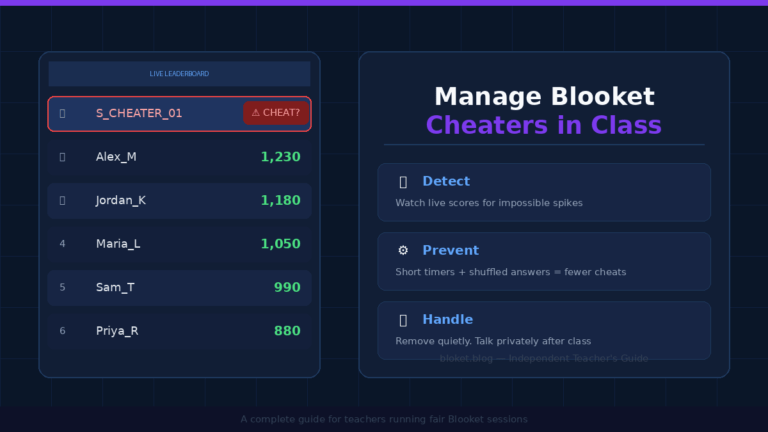
Walk the room. Even with a live leaderboard on the projector, physically circulating discourages the two most common off-task behaviors: looking up answers via a search engine and watching YouTube while the game runs in a separate tab.
Keep one eye on the teacher dashboard. The live view shows per-student question accuracy. If a student is sitting at 25% correct, you can check in privately rather than waiting for the end-of-game summary.
After the game ends
The post-game report is the most underused feature by middle school teachers. It shows which questions had the lowest correct-answer rates across the class. A question that only 40% of students answered correctly is a signal — that concept probably needs reteaching before the unit assessment.
Spend two to three minutes reviewing the two or three hardest questions as a class after the game. It closes the learning loop and frames the activity as instruction, not just a reward.
Subject-specific ways to use Blooket in grades 6–8
Blooket adapts to any subject where multiple-choice questions make sense. The key is building or sourcing question sets that match your actual curriculum, not generic sets using different terminology than your textbook.
ELA: vocabulary and reading comprehension
For ELA teachers, Blooket works best for vocabulary review — matching definitions to words, identifying parts of speech, or distinguishing commonly confused terms. Our guide to the best Blooket sets for English class covers vocabulary, grammar, and reading sets by skill. Reading comprehension is trickier because passage-based questions assume students can access the text mid-game.
A practical workaround: display the reading passage on the projector while students play. Frame it as an open-note session. Students stay engaged with the game mechanics while also practicing the skill of locating information quickly in a text.
Math: fluency and problem review
Math teachers use Blooket most often for fluency practice — integer operations, fraction work, proportional reasoning — where questions are fast and the format is straightforward. Our roundup of the best Blooket sets for math class covers grade-matched options and the right mode for each. For multi-step problems, reduce the question count and extend the per-question timer so students have time to actually work through the math rather than guess from the choices.
Blooket’s image support means you can screenshot a geometry diagram or coordinate plane and embed it directly in a question. This works well for angle problems, graph identification, and area and perimeter setups.
Science and social studies: content review
Both subjects involve large amounts of factual content — vocabulary, sequences, cause-and-effect relationships, key figures — that maps cleanly onto multiple-choice formats.
For science, build sets around unit vocabulary first, then layer in conceptual questions as students move deeper into the material. For social studies, sequencing questions (“Which event came first?”) and cause-effect pairings add more depth than pure recall and push students to think rather than just memorize.
Common mistakes middle school teachers make with Blooket
Most Blooket problems in middle school classrooms come from the same handful of avoidable errors.
Running the game without a clear learning goal
Blooket is engaging enough to fill time without teaching anything. If the question set is too easy, students cruise without thinking. If it’s unrelated to current content, it’s entertainment, not instruction.
Every session should connect to a specific, nameable objective — “Students will practice identifying figurative language” or “Students will review the causes of World War I” — something you can check against the post-game data afterward.
Overlooking the reports tab
The reports tab shows per-student accuracy, time spent per question, and the questions the class struggled with most. Teachers who skip this are leaving the most useful part of the platform untouched. Check the report after every session to identify gaps before the next assessment, not after it.
Letting games run too long
Middle schoolers are highly engaged with Blooket for roughly 15–20 minutes. After that, a portion of students starts drifting — especially in lower-energy modes like Factory or Café. End the game at peak engagement rather than waiting for energy to drop.
A useful signal: if more than three or four students are visibly off-task, the game has gone past its optimal window.
Using the same mode every time
Students lose interest in any format that becomes too predictable. Rotate through at least three or four modes across a unit. Introduce a new mode briefly before starting so students understand the mechanics before the first question appears.
Is Blooket Plus worth it for middle school teachers?
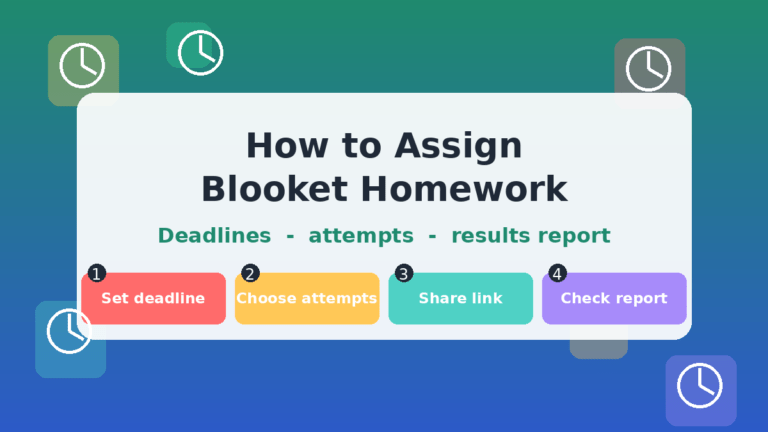
Blooket Plus is the platform’s paid subscription tier for teachers. The free version lets you host games, access the full public question library, and view basic post-game reports — enough to run a strong classroom program. Blooket Plus adds access to additional game modes, more detailed reporting, and the ability to assign games for students to complete independently outside of class.
For most middle school teachers, the free tier covers classroom use well. Blooket Plus becomes more valuable if you want students completing Blooket sessions for homework or if you need to track progress across multiple sessions over a longer period. The best approach: use the free tier for a full unit first, then decide whether the Plus features would genuinely change how you use the tool.
FAQs
Do middle school students need a Blooket account to play? No. Students join a live game by entering a six-digit code at blooket.com/play — no account, email, or login required. This makes setup fast and removes consent complications for guest play. A student account is only needed if they want to save blooks or play solo sets independently outside of class.
How many questions should a middle school Blooket set have? Aim for 20–30 questions for most sessions. Fewer than 15 means repeats appear too quickly and reduce the sense of challenge. More than 35–40 tends to make sessions feel long. A 25-question set in Gold Quest mode typically runs 15–18 minutes at a natural pace.
Is Blooket safe and COPPA-compliant for middle school students? Blooket is designed for educational use and follows COPPA guidelines for users under 13. Since middle school includes students who may be 11–12, check your district’s approved software list before rolling out Blooket broadly. Students who join as guests — no account created — involve the least data collection.
Can I use Blooket for formative assessment? Yes, and it’s one of the strongest use cases. The post-game report shows per-question accuracy across the class, making it a useful knowledge check before a unit assessment. It won’t replace a written test for tracking individual mastery, but it gives a fast class-level snapshot of where gaps exist.
What devices work with Blooket? Blooket runs in any modern web browser, so it works on Chromebooks, iPads, Windows laptops, and smartphones. No download is required for students joining a live game, though a Blooket app is available for iOS and Android. Chromebooks are the most common setup in middle school, and the browser version performs well on them.
How do I prevent students from using inappropriate usernames? Enable “Name Approval” in the game settings before students join. All submitted usernames appear in your teacher dashboard for approval before going live in the game. It adds about 60 seconds to the join process and eliminates the problem entirely.
Can I assign Blooket as homework? Solo mode, which lets students work through a question set at their own pace, is available on the free tier. Blooket Plus adds extended assignment and tracking options for independent play. If you assign solo play as homework, share the question set link directly — students can access shared sets without an account, though tracking individual progress requires a student login.
Conclusion
Blooket earns its place in a middle school classroom by doing something most review tools can’t: it makes students want to answer more questions. The competitive mechanics, the collectible characters, and the social stakes align with what drives engagement at this age. But the tool works best when you run it with a clear purpose — strong question sets tied to real objectives, modes matched to your context, and a habit of checking the data afterward.
Start with one question set tied to content you’re teaching this week. Run a 15-minute Gold Quest session, check the post-game accuracy report, and revisit the two or three questions your class struggled with most. That loop — game, data, reteach — is where Blooket moves from Friday reward to actual teaching tool
Find clarity fast using quick scans—just the good stuff, zero noise.